I started selling digital marketing and social media gigs on Fiverr 2 years back. No agency, no portfolio, no clients lined up.. Just an account and a hope it would work for me as I saw it works for other beginners.
It did. Eventually. But not the way most “Fiverr success” posts make it sound.
If you’re a student or beginner considering Fiverr right now, this isn’t going to be another generic “Fiverr is amazing, start today!” post. This is what actually happened: the good, the frustrating, and what I’d tell a beginner starting from zero today.
What is Fiverr, Quickly
Fiverr is a freelance marketplace where you create “gigs” -listings advertising a service you offer- and buyers come to you. Unlike platforms where you pitch clients directly, Fiverr works in reverse: you set up your store, optimize it, and wait for orders to come in.
It covers almost every digital service imaginable: writing, design, voiceovers, social media management, video editing, programming, and more. As a student, this matters because you don’t need a business registration, a portfolio website, or any formal credentials to get started, just a skill and the willingness to learn how the platform works.
Fiverr also has seller tiers: you move from New Seller to Level 1, Level 2, and eventually Top Rated as you complete orders and maintain good ratings. Each tier unlocks more visibility in search, higher order limits, and more trust from buyers. As a beginner, you’ll start at the very bottom of that ladder, which is exactly why your first month on the platform matters more than people realize.
It’s genuinely easy to set up. Within an hour of creating my account, I had a live gig. No interview, no approval process, no waiting period. For a student with zero connections or portfolio, that low barrier to entry is real and valuable. You’re not competing for a spot, you’re just publishing and seeing what happens.
The service categories are versatile. Whatever skill you have, even ones you don’t think are “marketable”-there’s likely a buyer category for it. I started with basic social media management and later expanded into related services once I understood what buyers were actually searching for. Looking through the categories before you pick your first gig is worth doing slowly; Fiverr’s search data (visible in the gig creation flow) gives you a rough sense of what’s actually in demand versus what just sounds good in theory.
No need to chase clients. Unlike cold-pitching on LinkedIn or sending Upwork proposals into a void, buyers come to you on Fiverr. Once your gig is live and optimized, the platform does the discovery work for you-when it actually decides to show your gig to the right people, which is its own challenge (more on that below).
You learn freelancing fundamentals fast. Even with the platform’s flaws, Fiverr forced me to learn things I’d later use everywhere, how to write a clear scope of work, how to price a service, how to handle a difficult client professionally, and how to ask for a review without sounding desperate. These skills transfer directly to Upwork, direct clients, or any future freelance work.
The Frustrating Parts-What Nobody Tells Beginners
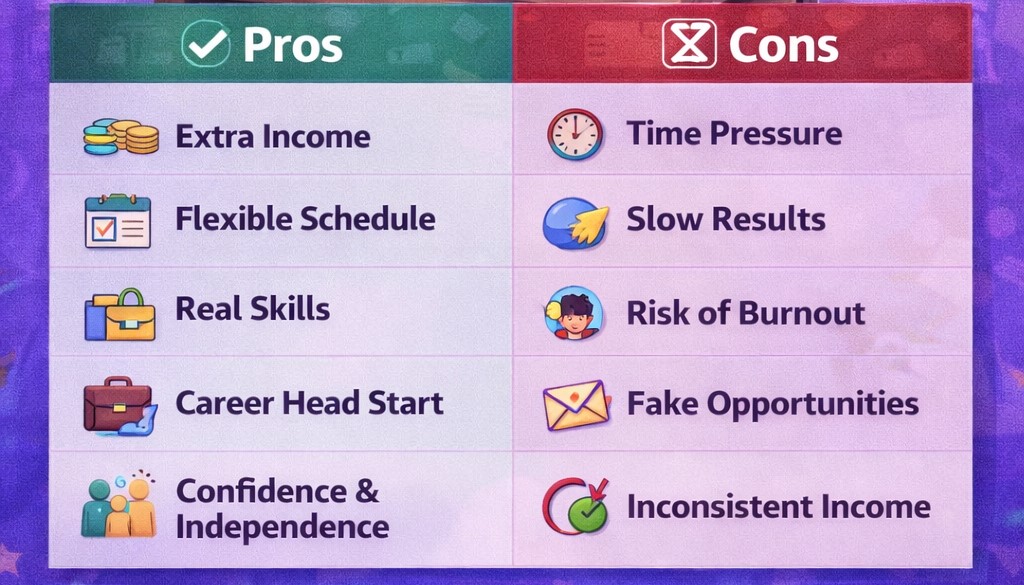
The fees are high. Fiverr takes a flat 20% cut from every order, regardless of price or seller level. On a $50 gig, you walk away with $40. On a $15 gig-which is realistically where most beginners start, that’s only $12 in your pocket. For students pricing low to attract their first buyers, that cut stings more than the marketing makes it sound.
Discoverability is a real problem starting out. This is the part most reviews gloss over. With zero reviews and no sales history, your gig is buried beneath thousands of competitors offering the same service. Fiverr’s search algorithm heavily favors established sellers with order history and fast response times new accounts get minimal organic visibility until you break through that initial barrier. I spent my first couple of weeks getting almost no impressions at all, which felt discouraging before I understood why it was happening.
Scammers exist on both sides. I encountered buyers attempting to get free revisions indefinitely, asking for work outside the agreed scope without extra payment, or trying to move communication off-platform to avoid Fiverr’s fees entirely. That last one is a trap, moving off-platform violates Fiverr’s terms and immediately removes your buyer and seller protections if anything goes wrong. Vet unusual requests carefully, and keep every conversation and payment inside the platform.
Customer expectations can be unrealistic for the price. Some buyers paying $15–$20 expect agency-level output and unlimited revisions. Learning to set clear boundaries in your gig description, what’s included, how many revisions, what counts as “rush” does save a lot of back-and-forth frustration later.
Is Fiverr Actually Worth It for Beginners?
Honestly and in overall yes, but with realistic expectations. Fiverr is not a fast or guaranteed income source. It’s a low-risk way to test whether you can sell a skill online, build initial reviews, and learn the freelance fundamentals you’ll use everywhere else (Upwork, direct clients, your own website).
Treat your first 30–60 days as an investment phase, not an income phase.
A Realistic Earnings Timeline for Beginners
Most beginner guides skip actual numbers, so here’s a rough, honest framework based on common patterns sellers report (and roughly matches my own experience):
Weeks 1–4: Low to zero visibility. Focus entirely on gig optimization and getting your first 3–5 reviews, even at low prices. Expect $0–$50 total.
Weeks 5–8: As reviews accumulate, visibility starts improving. Orders become more consistent. Realistic range: $50–$200 for the month.
Months 3–6: With a steady review base and improved gig ranking, beginners offering in-demand services can realistically reach $200–$600/month working part-time around classes.
Beyond month 6: Sellers who stay consistent, raise prices gradually, and expand their service offerings can reach $500–$1,500+/month, though this depends heavily on niche, responsiveness, and how much time you invest.
These numbers assume consistent effort: checking the platform daily, optimizing your listings for search, responding fast, and treating early low-paying orders as reputation-building rather than dismissing them.
Build a portfolio before you launch, even a fake one. Create 3–5 sample pieces of work- for digital marketing, this could be mock social media content calendars or sample ad copy. Buyers want proof before they trust someone with zero reviews.
Start with lower rates than feels comfortable. Your first 5–10 orders aren’t about profit, they’re about generating reviews. A review-backed $15 gig will outsell a no-review $50 gig every time. Raise your rates gradually as reviews accumulate.
Get your first reviews fast-ethically. Ask friends or family who genuinely need the service to place a real order and leave honest feedback. This isn’t fake reviews, it’s real work for real people, just within your existing network to get the visibility snowball started.
Respond fast and over-deliver early. Fiverr’s algorithm rewards response time and completion rate heavily in the first few weeks. Treat your first handful of clients like they’re paying $500, not $15.
Fiverr vs the Alternative: Should You Start Here?
If you want the absolute lowest barrier to entry with zero outreach required, Fiverr is hard to beat for a beginner. The trade-off is the discoverability climb in the first month or two. If you’re comfortable cold-pitching and want to skip the visibility problem, a platform like Upwork (check Fiverr vs Upwork for beginners) might suit you better, but that’s a comparison for a separate guide.
Is Fiverr legit for beginners? Yes. Fiverr is a legitimate, widely-used platform with buyer and seller protections built in. The main risks come from individual bad-actor buyers or sellers, not the platform itself.
How much does Fiverr take in fees? Fiverr charges a flat 20% service fee on every completed order, deducted automatically before payout.
How long does it take to get your first order on Fiverr? It varies widely-some sellers get an order within days, others wait several weeks. Optimizing your gig title, using lower introductory pricing, and promoting your gig outside Fiverr (social media, your blog) speeds this up significantly.
Can a complete beginner with no portfolio succeed on Fiverr? Yes, but expect a slower start. Building even a small sample portfolio before launching and pricing competitively in your first weeks makes the biggest difference.
What’s the best Fiverr category for students to start with? Categories with low production cost and quick turnaround tend to work well for beginners-writing, social media content, basic graphic design with Canva, and proofreading are all accessible without expensive tools or years of experience.
Affiliate disclosure: This post contains affiliate links. If you sign up through my links, I may earn a small commission at no extra cost to you.
If you are thinking about starting a blog or a website to make money online, the first thing you will need is web hosting (where your website will live). And one of the first names that keeps coming up for beginners is Hostinger.
I do not just know Hostinger from research. I actually use it to host this blog, HustlePayNow. So this review is based on real experience, not theory.
Let me be straight with you: I will cover what Hostinger does well, what it does not do well, and whether it makes sense for someone starting from zero with a limited budget.
What is Hostinger?
Hostinger is a web hosting company founded in 2004. It currently serves over 29 million users across 178 countries. It offers shared hosting, VPS hosting, cloud hosting, and a website builder, but for beginners, the shared hosting plans are the main focus.
What made Hostinger popular is simple: it offers affordable pricing without cutting corners on performance. Most beginner-friendly hosts either charge too much or give you a slow, clunky experience. Hostinger tries to hit the middle ground.
Who is Hostinger best for?
Hostinger is a strong fit if you are:
A beginner with a tight budget
Starting your first blog, portfolio site, or freelancing website
Someone who wants a simple setup without needing technical knowledge
Looking to make money online through blogging, affiliate marketing, or freelancing
If you are running a large e-commerce store or a high-traffic website, you will eventually outgrow the basic plan. But for starting out, it covers everything you need.
Hostinger pricing: what do you actually pay?
This is where Hostinger stands out. The Premium Shared Hosting plan, which is the one most beginners go with, starts at around $2.99 per month when billed for a longer period. That includes a free domain name, free SSL certificate, and enough resources to run a WordPress blog comfortably.
There is one thing to be aware of: the low price is tied to a longer billing cycle, usually 12 to 48 months paid upfront. When you renew, the price goes up. So the $2.99/month rate is your entry price, not your forever price. Still, even at renewal rates, Hostinger stays competitive compared to most alternatives.
For someone just starting out who wants to spend as little as possible while building something real, this pricing structure makes sense.
Setting up WordPress on Hostinger
This is one of the strongest parts of the Hostinger experience for beginners. You do not need to know anything about servers or technical setup.
When you log into the Hostinger dashboard (called hPanel), there is a one-click WordPress installer. You fill in your site name, create a username and password, and WordPress is installed in under two minutes. I will cover this setup in details in my upcoming post so stay tuned!
hPanel itself is clean and easy to navigate. It is not the old-school cPanel interface that most beginners find overwhelming. Everything is laid out in plain language, from managing your domain to setting up email to installing plugins.
I set up this blog on Hostinger and had the site live within the same day, with no prior hosting experience.
Speed and performance
Page speed matters for two reasons. First, slow sites frustrate visitors and they leave. Second, Google uses speed as a ranking factor, which means a slow site hurts your chances of getting organic traffic.
Hostinger uses LiteSpeed web servers, which are faster than the Apache servers most budget hosts use. They also include a built-in caching tool and free CDN (content delivery network) on most plans, which helps your site load faster for visitors regardless of where they are in the world.
For a beginner blog with low to medium traffic, Hostinger’s speed is more than sufficient. You will not be running into performance issues at 100 to 1,000 visitors per day.
Uptime: is the site always online?
Hostinger advertises 99.9% uptime, and in practice it holds up. Since I launched this blog, I have not experienced any noticeable downtime. Your site being accessible around the clock matters when you are trying to build traffic and credibility.
Customer support
Hostinger offers 24/7 live chat support. This is important for beginners because questions come up at all hours, especially when you are setting things up for the first time.
The chat responses are generally fast and the agents are helpful. There is also a large knowledge base with tutorials covering common questions. I used the live chat once when I was confused about pointing my domain, and the issue was resolved in about ten minutes.
One thing to note: Hostinger does not offer phone support. For some people that is fine. For others who prefer talking to someone, that could be a drawback.
What Hostinger does not do well ‘cons’
No hosting company is perfect. Here is where Hostinger falls short:
Renewal pricing increases. The discount is for new customers. When your plan renews, you pay the regular rate. It is still affordable, but the jump can catch you off guard if you are not expecting it.
Email hosting limits. The basic plan includes free email, but storage is limited. If you plan to run a heavy email operation, you will hit that ceiling.
No phone support. As mentioned above, if you prefer a phone call over live chat, Hostinger is not the right fit.
Upsells during checkout. Hostinger adds extras like domain privacy and security tools during the purchase process. They are optional, but you need to pay attention and uncheck what you do not need.
Hostinger vs the alternatives
Compared to Bluehost, Hostinger is cheaper at entry and renewal. Bluehost is slightly harder to recommend for strict budget beginners since the entry pricing, while low, does not match Hostinger’s.
Compared to SiteGround, Hostinger wins on price. SiteGround is faster and has stronger support, but it costs significantly more, which matters when you are starting with nothing.
Compared to free hosting options like WordPress.com or Blogger, Hostinger is a completely different category. Free hosting means you do not own your domain, you cannot monetize freely, and you are building on rented land. If you are serious about making money online, free hosting is a false economy. You build on solid base and something you own.
My honest verdict
Hostinger is the hosting I chose for this blog, and I would choose it again.
For beginners who want to start a blog, a portfolio, or any kind of online presence to make money, it checks the important boxes: it is affordable, easy to set up, fast enough, reliable, and well supported.
It is not the most powerful host on the market. But for where you are right now, starting out with a limited budget and a goal to build something that generates income, Hostinger gives you everything you need to get going without wasting money.
If you are ready to start, the Premium Shared Hosting plan is the one to go with. It includes a free domain for the first year, which saves you around $10 to $15 right away.
Is Hostinger good for beginners? Yes. Hostinger is one of the most beginner-friendly hosting providers available. The dashboard is simple, WordPress setup takes under two minutes, and the support team is available around the clock via live chat. You do not need any technical knowledge to get started.
How much does Hostinger cost per month? Hostinger’s Premium Shared Hosting starts at around $2.99 per month when billed for a longer period. This includes a free domain, free SSL, and enough resources to comfortably run a WordPress blog. Renewal prices are higher, so factor that in when budgeting.
Can you make money with a Hostinger website? Yes. The hosting itself does not make you money, but it gives you the platform to build something that does. Many bloggers and affiliate marketers use Hostinger to host sites that generate income through ads, affiliate links, freelancing portfolios, and digital products.
Is Hostinger reliable? Does it go down often? Hostinger advertises 99.9% uptime and delivers on it in practice. Since launching this blog on Hostinger, I have not experienced noticeable downtime.
Fiverr vs Upwork for beginners the one traditional question every beginner who has decided to start freelancing might ask. That’s why you are here, you have no idea which one to start with. You have no portfolio. No client reviews. Maybe no clear skill yet. And you need to make money, not spend it figuring things out. Don’t worry This post is written specifically for you, the complete beginner. Not for experienced freelancers looking to scale. Not for agencies. For the person starting from zero who wants to know: where do I go first to make my first dollar online?
Spoiler: one of these platforms is dramatically more beginner-friendly than the other, and by the end of this post, you’ll know exactly which one to join today.
disclosure: This post contains affiliate links. If you sign up through my links, I may earn a small commission at no extra cost to you. I only recommend platforms I genuinely believe in.
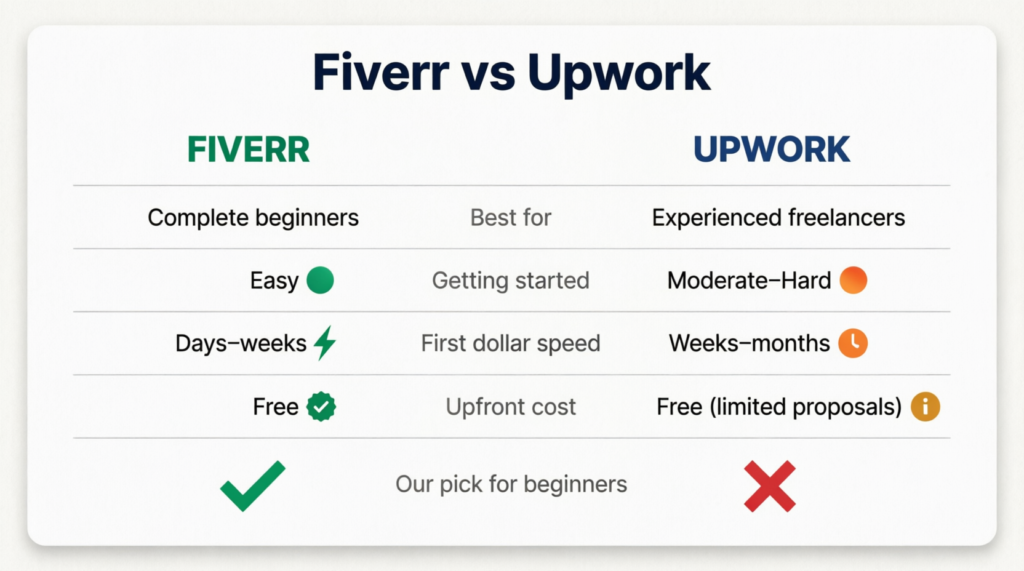
Quick Verdict: Fiverr vs Upwork at a Glance
What is Fiverr?
Fiverr is a freelance marketplace where you create a “gig” (basically a listing of a service you offer) and buyers come to you. You set your price, describe what you do, and wait for orders to come in.
That’s the key difference: on Fiverr, buyers find you. You don’t have to pitch anyone or write proposals. You set up your profile once and let the platform do the work of connecting you with clients.
It’s completely free to join and start selling. Fiverr takes a 20% cut from your earnings, but you never pay anything upfront.
Upwork is also a freelance marketplace, but it works very differently. Instead of clients coming to you, you go to them. You browse job postings, write proposals, apply, and then wait to hear back.
Upwork is a legitimate platform with serious clients and well-paying contracts. But it’s built for freelancers who already have something to show: a portfolio, past client reviews, proven skills.
There’s also a catch for beginners: Upwork uses a system called “Connects” (credits you spend every time you apply to a job). New accounts get a limited number of free Connects, and after that, you have to buy more. That means you could spend money just applying to jobs, with no guarantee of landing one.
For someone starting with zero experience and a tight budget, that’s a real risk.
Fiverr vs Upwork for beginners: 5 Things That Matter
1. Ease of Getting Started
Fiverr wins.
Setting up a Fiverr account takes under an hour. You create a profile, write a gig title, add a description, set your price, and you’re live. No approval process. No waiting room. You’re immediately searchable by buyers.
Upwork requires a detailed profile, a strong work history section, and crucially, account approval. Upwork has become stricter about who they let in, and new applicants without a clear professional history sometimes get rejected outright.
For a beginner, Fiverr’s barrier to entry is close to zero. Upwork’s is noticeably higher.
2. Do You Need Experience?
Fiverr: No. Upwork: Practically yes.
On Fiverr, complete beginners land their first gigs every day. The trick is starting with a lower price point to attract early orders and build your first few reviews. Once you have 5-10 reviews, you can raise your prices.
On Upwork, clients read your profile carefully before hiring. They look at reviews, work history, and past projects. Without any of those, you’re competing against established freelancers with years of track record, and clients almost always choose experience over a cheaper unknown.
This doesn’t mean Upwork is impossible for beginners. It means it’s the wrong first step.
3. How Fast Can You Make Your First Dollar?
Fiverr: potentially within your first week.Upwork: realistically 4-8 weeks minimum.
On Fiverr, if you set up a well-written gig in a searchable niche and price it competitively, you can get your first order within days. Many beginners report landing their first sale in the first 1-2 weeks.
On Upwork, even if your profile gets approved, you then need to write tailored proposals for each job, wait for responses, go through interviews, and get selected. That process takes time, and most beginners go through weeks of silence before landing anything.
If your goal is to make money fast with no experience, Fiverr is the clear answer.
Both platforms take 20% from your earnings as a new seller. Be aware of this when setting your prices. If you want to earn $20, charge $25.
On Fiverr, that’s the only cost. You never pay to list a gig or apply for anything.
On Upwork, you also have the Connects system. Every job application costs Connects. New accounts start with a small free allocation, and once those run out, you buy more (roughly $0.15 per Connect, and most jobs cost 6-16 Connects per application). For a beginner sending out lots of proposals with low success rates, this adds up quickly.
Your audience is here to make money, not spend it. That alone tilts the balance firmly toward Fiverr.
5. Risk of Losing Money
Fiverr: zero financial risk.Upwork: real risk for beginners.
On Fiverr, you only work after a buyer has already paid. The money sits in escrow until you deliver. You cannot lose money.
On Upwork, beyond the Connects cost, there’s also the time investment in writing detailed proposals that may never get a response. Time is money, especially when you’re starting out and need early wins to stay motivated.
Who Should Use Fiverr?
Fiverr is the right starting point if you are:
A student or complete beginner with no portfolio
Someone who wants to earn money fast without pitching clients
Offering any digital or creative service: writing, graphic design, video editing, social media, data entry, translation, voice-over, and more
Working with a tight budget and can’t afford to risk money on proposals
If that sounds like you, start here. It’s free, it’s fast, and you don’t need anyone’s permission to begin.
Have a portfolio of completed work to show clients
Have testimonials or reviews from past clients (even from Fiverr)
Are looking for long-term contracts rather than one-off gigs
Upwork has higher average contract values than Fiverr, and its clients tend to be more serious businesses. But you need credibility to access that. Fiverr is how you build that credibility first.
We’ll cover exactly how to succeed on Upwork in a future post, but if you’re just starting out, it’s not your first stop.
Common Beginner Mistakes to Avoid on Both Platforms
Whether you start on Fiverr or eventually move to Upwork, avoid these early mistakes:
Pricing too high before your first review. Start lower to land those first few orders, then raise your rate.
Writing a vague gig title. “I will help you with stuff” won’t rank. Be specific: “I will write SEO blog posts for your small business.”
Skipping the profile photo. Profiles without a clear photo get far fewer clicks. Use a real, friendly photo.
Ignoring your gig description. Your description is your sales page. Explain clearly what you offer, what the buyer gets, and why you’re the right choice.
On Upwork: sending generic proposals. If you eventually move to Upwork, every proposal needs to be tailored to that specific job. Copy-paste proposals get ignored instantly.
It’s free to join, requires no experience, gets you earning faster, and carries zero financial risk. It’s designed for exactly the situation you’re in right now, starting from zero and wanting to turn a skill into income.
Upwork is a great platform. It’s just not your first step. Build your reputation on Fiverr first. Get your first 5-10 reviews, develop your process, and learn what clients actually want. Then, when you’re ready, Upwork will be a much easier platform to break into.
But that’s a problem for later. Right now, your job is to get started.
Which is better for beginners, Upwork or Fiverr? Fiverr is significantly better for beginners. It requires no experience, no upfront cost, and lets you start earning within days of setting up your profile. Upwork is better suited for freelancers who already have experience and a portfolio to show.
Can you make $10k a month on Upwork? Yes, but it’s not typical for beginners. $10k/month on Upwork usually requires strong skills (design, dev, marketing, copywriting), a solid profile, consistent client acquisition, and repeat/high-ticket clients. Most freelancers take months or years to reach that level.
What pays more, Upwork or Fiverr? None of these 2 platforms inherently pays more, it depends on how you use them.
Upwork: better for high-value, long-term contracts and hourly work
Fiverr: better for productized services and scalable offers Top earners exist on both, but Upwork tends to lean toward higher-ticket clients.
Which freelancing is best for beginners? For most beginners, Fiverr is the easiest entry point to get first clients and experience. Upwork becomes more powerful once you already have skills, reviews, or a portfolio to compete with stronger freelancers.
Found this helpful? Share it with a friend who’s thinking about starting freelancing. It might save them weeks of confusion.
Let’s be honest $500/month as a student changes everything. That’s textbooks covered. That’s your share of the rent. That’s not having to say no every time your friends want to go out. That’s a little breathing room in a season of life that doesn’t always offer much of it.
The problem is most students think the only way to make money is to get a part-time job (early mornings, late nights, a boss scheduling you during exam week). But that’s not the only path anymore. In 2026, there are more flexible, student-friendly ways to earn money than ever before, and the best part is you can start with nothing but a laptop and a few spare hours a week.
In this guide, you’re going to learn exactly how to make money as a student, which methods are worth your time, and how to put together a realistic 30-day plan to hit your first $500. No fluff, no unrealistic promises just a clear roadmap that actually works for a student schedule.
Disclosure: Some links in this article are affiliate links. If you sign up through them, we may earn a small commission at no extra cost to you. We only recommend platforms we genuinely trust.
Let’s get into it.
Is $500/Month Realistic for a Student?
Yes, but let’s put it in perspective so you know exactly what you’re signing up for and what you should expect.
$500/month broken down is about $125 per week, or roughly $18 per day. If you’re earning $12/hour doing online work, that’s just over 10 hours a week. That’s one or two focused sessions across a few days, completely doable around classes, assignments, and a social life.
The students who don’t hit this number usually fall into one of two traps. Either they pick a method that takes months to pay off and give up before it does, or they try three different things at once and never gain traction on any of them.
The fix is simple: pick one method, give it 30 focused days, and stack results before adding anything else. That’s the whole strategy. And the objection most students have “I don’t have time” disappears when you realize 10 hours a week is less time than most people spend scrolling their phone.
$500/month is not a dream goal. It’s a math problem. And the math works.
Best Ways to Make Money as a Student
These are the methods that actually work for students in 2026 chosen because they’re flexible, beginner-friendly, and have a realistic path to $500/month without needing a degree or years of experience.
Freelancing (Writing, Design, Virtual Assistant)
Freelancing is one of the highest-potential ways to earn money as a student. You offer a skill could be anything useful like writing, graphic design, social media management, virtual assistant work and clients pay you per project or per hour. Platforms like Fiverr make it easy to get started with zero experience.
Time to first dollar: 1–2 weeks
Realistic earnings: $200–$800/month part-time
Difficulty: Medium, requires setup and a few samples upfront
Not the highest paying method, but the fastest way to earn your first dollar online. Platforms like Swagbucks and Survey Junkie pay you to complete surveys, watch videos, and test websites. Don’t expect to retire on this, but as a supplement alongside another method, it adds up.
Time to first dollar: Same day
Realistic earnings: $50–$150/month
Difficulty: Easiest of the list, zero skills required
Fiverr deserves its own mention outside general freelancing because the barrier to entry is so low. You don’t need to pitch clients or write proposals, you create a gig listing, set your price, and buyers come to you. Even simple services like data entry, making Canva graphics, or writing product descriptions can earn consistently.
Time to first dollar: 3–7 days after your first gig goes live
If you’re strong in any subject: math, science, English, history, a foreign language then online tutoring is one of the best-paying beginner options available to students. Platforms like Tutor.com, Wyzant, and Preply connect you with students who need help, and you set your own availability.
If you’re already taking good notes in class, you can sell them. Platforms like Stuvia and Nexus Notes let students upload and sell their study materials. It takes effort upfront but once your notes are listed, they earn passively every time someone buys them.
Time to first dollar: 2–4 weeks
Realistic earnings: $50–$200/month passively
Difficulty: Easy as you’re already doing the work
Cashback and Rewards Apps
This isn’t a side hustle in the traditional sense, it’s just making sure you earn money back on things you’re already buying. Imagine you buy your favorite goods and you earn cashback every time! that’s a real easy money. Apps like Rakuten give you cashback on online purchases, and combined with survey platforms, it’s effortless passive income alongside your main method.
Time to first dollar: Immediate on your next purchase
Realistic earnings: $20–$80/month depending on spending
This one takes longer to pay off but has no income ceiling. You recommend products or services through a blog, social media, or YouTube, and earn a commission every time someone signs up or buys through your link. It’s not a fast $500 strategy but it’s worth planting the seed early.
With seven options on the table, the worst thing you can do is try all of them at once. Here’s how to narrow it down fast:
Match your method to your time availability. If you have less than 5 hours a week, start with surveys and cashback apps: low effort, low reward, but something. If you have 10–15 hours a week, freelancing or tutoring will get you to $500 much faster.
Match your method to your existing skills. You don’t need to learn something new to start earning. Already write well? Freelance writing. Good at a subject? Tutoring. Organized and reliable? Virtual assistant work. The fastest path to your first dollar is almost always through a skill you already have.
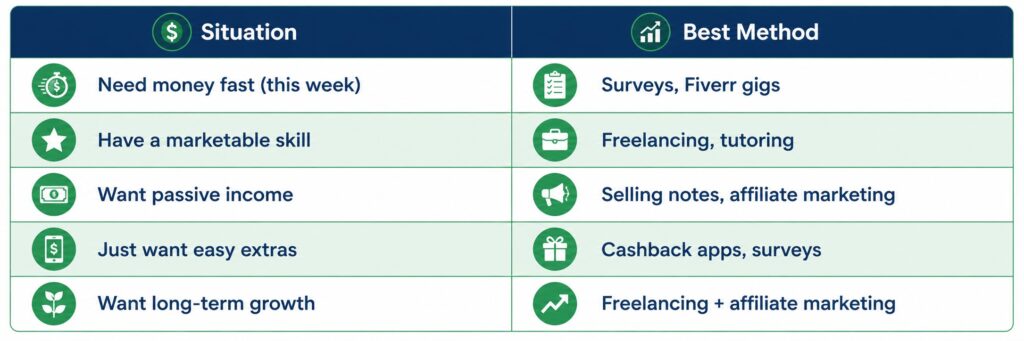
Match your method to your income urgency. Need money this week? Surveys and Fiverr gigs are your fastest options. Can you wait a month or two? Freelancing and tutoring pay more per hour and are worth the setup time.
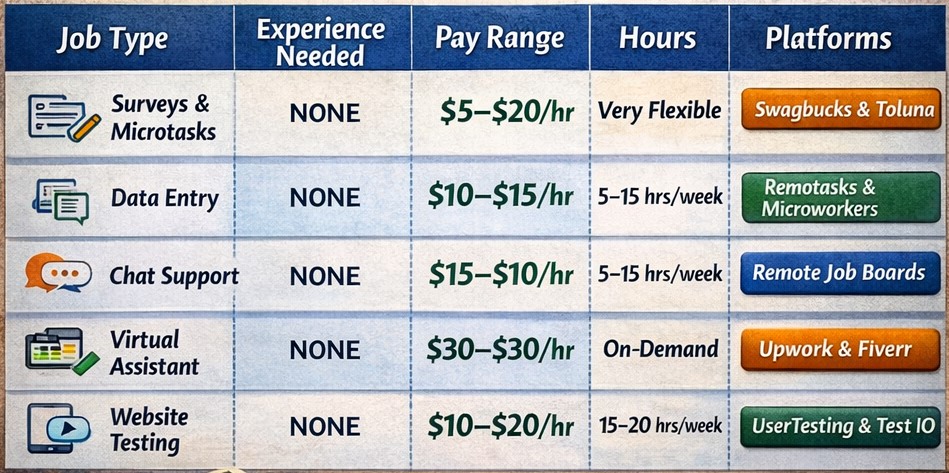
Use this simple decision table:
Pick one. Commit to it for 30 days. That’s the only rule.
Your 30-Day $500 Action Plan
This is where most guides stop, they give you a list and leave you to figure out the rest. Not here. Here’s exactly what to do, week by week, to hit your first $500.
Week 1-Pick Your Method and Set Up
Your only job this week is to get set up properly. No earning yet, just building your foundation.
Decide on one method based on the decision table above
Create your account on the relevant platform (Fiverr, Upwork, Swagbucks, Tutor.com, etc.)
Set up your profile completely: photo, bio, description
Create 2–3 samples of your work if you’re freelancing (write sample posts, design sample graphics, create a tutoring intro video)
Research what successful beginners in your category are doing and note what makes their profiles stand out
Don’t overthink this stage. A good enough profile published today beats a perfect profile that never goes live.
Week 2-Land or Complete Your First Task
This week is about momentum. Your first dollar earned matters more psychologically than financially, it proves the whole thing is real.
If freelancing: apply to 5–10 jobs per day on Upwork or make sure your Fiverr gig is fully optimized and live
If tutoring: apply to 3–5 platforms and respond to every inquiry within an hour
If surveys: complete at least 30–45 minutes of surveys per day
If selling notes: upload your first set of study materials and write a compelling description
Accept your first project or complete your first task even if the pay is lower than you’d like because your first goal is proof, not profit
By the end of week 2, you should have at least one completed task and ideally your first payment pending.
Week 3-Optimize and Get Your First Review
Now you have data. Use it.
Review what worked and what didn’t in week 2
If you got a client or completed a task: ask for a review or rating immediately, this is the single most important thing you can do for long-term growth
Improve your profile based on what you’ve learned: better title, clearer description, stronger samples
If freelancing: increase your outreach-aim for 10+ proposals per day
If tutoring: ask your first student for a referral or testimonial
Reinvest any early earnings into tools that save you time (Canva Pro, Grammarly, a scheduling app)
By week 3 you should have 1–3 completed tasks and your first real feedback from a client or platform.
Week 4-Scale What’s Working
You now have proof of concept. Week 4 is about multiplying it.
Identify your best-performing gig, service, or task type and double down on it
Raise your rate slightly if you’ve received positive feedback, even a 10–15% increase adds up
Add a second income stream that complements your first (for example: if you’re freelance writing, add cashback apps and surveys as passive extras)
Set a specific goal for next month, not just “$500” but “4 freelance clients at $125 each” or “10 tutoring sessions at $20/hour”
Track everything: hours worked, money earned, platforms used. This data becomes your roadmap for month two and beyond
By the end of week 4, hitting $300–$500 your first month is a realistic outcome. Month two, with the foundation already built, is where $500+ becomes consistent.
Tools That Make It Easier
These aren’t mandatory, but they make the whole process smoother and more professional, especially if you’re freelancing.
Notion: Free tool to track your income, client list, deadlines, and goals all in one place. Treat your side hustle like a business from day one and it’ll grow like one.
Canva: Free design tool that makes your Fiverr gig images, portfolio samples, and social media posts look professional without any design experience. The free tier is enough to start.
Grammarly: If you’re doing any writing-proposals, client emails, blog posts, or freelance writing gigs- Grammarly catches errors and makes your writing sharper. Free version covers the basics.
Swagbucks: Beyond surveys, Swagbucks lets you earn points on everyday online activity- shopping, watching videos, searching the web. It won’t replace your main income stream but it’s completely passive once set up.
Rakuten: Install the browser extension and earn cashback automatically on every online purchase. Zero effort, free money on things you’re already buying.
How to earn $500 per day as a student? Earning $500 per day as a student is possible but not realistic as a beginner. At that level, you’re looking at high-ticket freelancing, running an online business, or advanced affiliate marketing, all of which take months to build. Focus on $500 per month first, master one income stream, and scale from there. Students who try to jump straight to $500/day almost always burn out before they get there.
How to earn $1,000 daily as a student? $1,000 per day requires a business, not a side hustle. Think selling digital products at scale, running a monetized YouTube channel, or managing multiple high-paying freelance clients simultaneously. It’s a legitimate long-term goal, but it’s built on top of the $500/month foundation, not instead of it. Start small, build proof, then scale.
What are the top 5 side hustles for students? The top 5 side hustles for students in 2026 are freelancing (writing, design, or VA work), online tutoring, selling on Fiverr, completing paid surveys, and selling digital products or notes. Each has a different time-to-first-dollar and earning ceiling, freelancing and tutoring pay the most per hour, while surveys and cashback apps are the easiest to start. For the full breakdown, check out our guide on 15 Legit Side Hustles for College Students.
Your $500 Month Starts Today
Here’s the truth nobody tells you: the students who hit $500/month their first time aren’t smarter or more talented than you. They just started earlier and stayed consistent longer.
You now have the methods, the decision framework, and a week-by-week action plan. The only thing left is to pick one method and take the first step today- not tomorrow, not after exams, today.
Set up your profile. Complete your first task. Earn your first dollar. Everything else builds from there.
You want to start freelancing but you have zero experience, zero portfolio, and maybe zero idea where to even begin. Sound familiar, right? If you’re a beginner or someone completely new to online work, freelancing isn’t about getting rich overnight. It’s about turning downtime into income, building real-world skills, and creating a flexible side hustle that grows with you. In this guide, you’re going to learn exactly what freelance beginner jobs are worth your time, where to find them, how to land your first client even with no portfolio, and how much you can realistically expect to earn. By the end, you’ll have everything you need to take your first step.
Let’s get into it.
What Is Freelancing and How Does It Work?
Freelancing simply means offering a service to clients and getting paid per project or per hour, without being a permanent employee. You work when you want, from wherever you want, and you choose who you work with.
As a freelancer, you’re essentially running a tiny one-person business. A client needs something done (a blog post written, a logo designed, their inbox managed) you do it, they pay you, and everyone moves on. Simple as that.
For students, freelancing is honestly one of the best ways to make money because:
You set your own hours around your classes
You can work from your dorm room or anywhere with Wi-Fi
You don’t need a degree or years of experience to start
You build real skills and a real portfolio while getting paid
The most common question beginners ask is: “But don’t I need experience first?” The short answer is no. You need proof you can do the work, and that’s something you can create yourself, which we’ll cover later.
Best Freelance Beginner Jobs With No Experience
This is the section you actually came for. These are the best freelance jobs for beginners, chosen because they’re easy to learn, have real demand, and don’t require a degree or years of practice to get started.
1. Freelance Writing
If you can write clearly and explain things well, freelance writing is one of the easiest entry points into freelancing. Clients need blog posts, product descriptions, email newsletters, social media captions, and more constantly.
Skills needed: Good grammar, ability to research topics, basic understanding of writing for the web
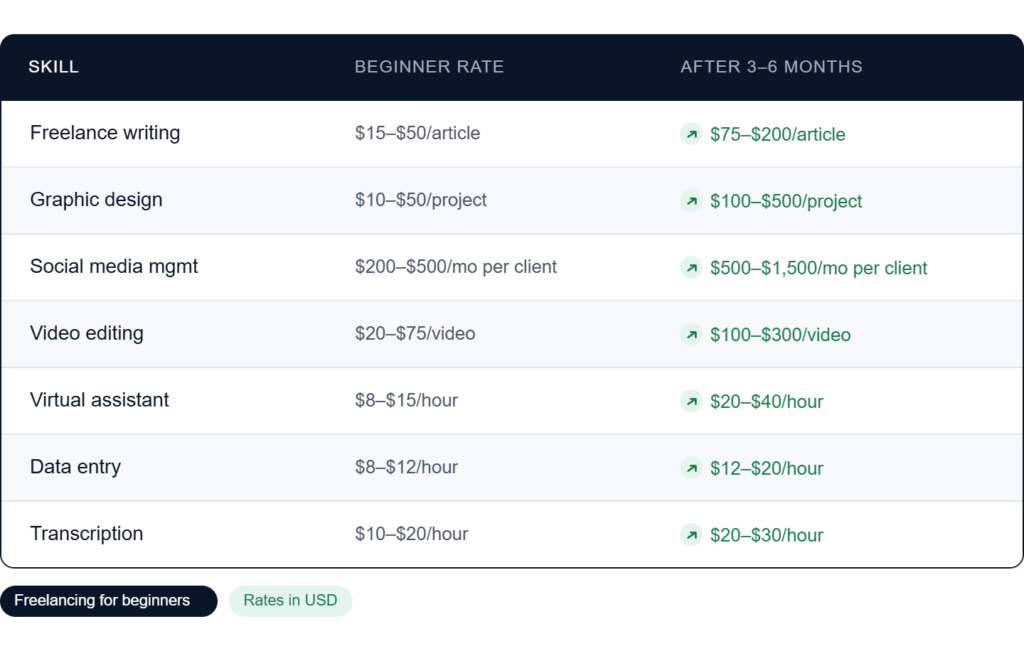
Realistic earnings: $15–$50 per article as a beginner, $100+ as you build experience
Where to find gigs: Fiverr, Upwork, ProBlogger job board, LinkedIn
The best part? You can create writing samples on a free Medium account or Google Docs and use those as your “portfolio” even before your first paid client.
Our guide will help you decide between Fiverr and Upwork, check it from here
2. Graphic Design
If you have a good eye for visuals and you’re willing to learn tools like Canva or Adobe Express (both beginner-friendly), graphic design is a high-demand skill. Businesses need logos, social media graphics, presentations, flyers, and thumbnails constantly.
Skills needed: Basic design sense, familiarity with Canva or Adobe tools
Realistic earnings: $10–$50 per design as a beginner, $100–$300+ for logos as you improve
Where to find gigs: Fiverr, 99designs, Dribbble, Instagram
Start by designing a few sample logos or social media posts for fictional brands. That’s your portfolio.
3. Social Media Management
Every small business knows they need to be on Instagram or TikTok, but most owners have no time to run their accounts. That’s where you come in. Social media management means creating content, scheduling posts, responding to comments, and growing an account.
Skills needed: Familiarity with social platforms, basic content creation, Canva for graphics
Realistic earnings: $200–$500/month per client as a beginner
Where to find gigs: LinkedIn, local Facebook groups, cold outreach to small businesses, Upwork
This is one of the best beginner freelance jobs for students because you’re already using these platforms every day.
4. Video Editing
Video content is exploding and most creators like YouTubers, TikTokers, businesses don’t edit their own videos. If you can learn basic editing on tools like CapCut (free) or DaVinci Resolve (free), you’re in a market with serious demand.
Skills needed: Basic video editing, understanding of pacing and transitions, subtitles
Realistic earnings: $20–$100 per video as a beginner
Where to find gigs: Fiverr, YouTube creator communities, Discord servers, Upwork
Edit a few sample videos using free YouTube footage and post them as your demo reel.
5. Virtual Assistant (VA)
A virtual assistant handles tasks that busy entrepreneurs and business owners don’t have time for scheduling, email management, data entry, customer support, research, and more. No specific technical skill required, just organization and reliability.
Skills needed: Good communication, organization, basic computer skills
Realistic earnings: $10–$20/hour as a beginner
Where to find gigs: Upwork, Fiverr, Belay, Time Etc, LinkedIn
This is perfect if you’re not sure what skill to start with. VA work teaches you how businesses operate while you get paid.
6. Data Entry
It’s not glamorous, but data entry is one of the most beginner-friendly freelance jobs out there. Clients need spreadsheets filled, databases updated, forms processed, and information organized.
Skills needed: Attention to detail, basic Excel or Google Sheets
Realistic earnings: $8–$15/hour
Where to find gigs: Upwork, Freelancer.com, Clickworker, Amazon MTurk
Great as a first gig to build reviews and get comfortable with client work.
7. Transcription
Transcription means listening to audio or video recordings and typing out what’s being said. It sounds simple because it is, but it requires focus and accuracy.
Skills needed: Fast typing, good listening, attention to detail
Realistic earnings: $10–$25/hour depending on speed and accuracy
Where to find gigs: Rev.com, TranscribeMe, GoTranscript, Upwork
You can test and improve your typing speed for free at typing.com before applying anywhere.
8. Web Research
Businesses and entrepreneurs often need someone to gather information, competitor analysis, lead lists, market research, contact details. If you’re good at finding information online quickly, this is a surprisingly in-demand skill.
Skills needed: Strong Google skills, ability to organize information clearly
Realistic earnings: $10–$20/hour
Where to find gigs: Upwork, Freelancer.com, LinkedIn
How to Choose the Right Freelance Skill (If You’re Not Sure Yet)
This is the question nobody talks about enough. Most guides just throw a list of skills at you and say “pick one” but how do you actually decide?
Here’s a simple framework to find the right fit:
Start with what you already do. You probably have more transferable skills than you think. Do you write well? That’s freelance writing. Are you the friend who always fixes people’s Instagram feeds? That’s social media management. Do you type fast and stay organized? Virtual assistant work is waiting for you. The best starting skill is usually the one that already feels natural.
Think about your setup. Video editing requires a decent laptop and free time to practice. Data entry just needs a computer and focus. Social media management can be done from your phone. Match your skill to your current tools and schedule, don’t wait until you have the “perfect” setup.
Consider the time-to-first-client curve. Some skills get you hired faster than others. Data entry and transcription have low barriers, you can be earning within days. Graphic design and video editing take longer to learn but pay more once you do. If you need money quickly, start with a simpler skill and build toward higher-paying ones over time.
Don’t overthink it. The biggest mistake beginners make isn’t picking the wrong skill.. it’s spending three weeks deciding instead of starting. Pick something that feels doable, commit to it for 60 days, and adjust from there. You can always add a second skill later once you have momentum.
A good rule of thumb: if you can imagine doing the work for two hours without getting bored, it’s worth trying.
How to Grow From Your First Gig to Consistent Income
Landing your first client is exciting. But the real goal is building something consistent, predictable income that grows month after month. Here’s how to make that transition:
Deliver so well that clients come back. Your best source of new work is your existing clients. Every project you complete is a chance to impress someone enough that they hire you again or refer you to someone else. Over-deliver on your first few projects even if you’re undercharging. The reviews and reputation you build in the first 90 days will do more for your income than any marketing strategy.
Raise your rates intentionally. After your first five reviews, raise your rates by 20–30%. After ten reviews, raise them again. Most beginners undercharge for way too long because they’re afraid of losing clients. In reality, raising your rates often filters out low-quality clients and attracts better ones. A higher price signals experience, even when you’re still building it.
Move toward retainers. One-off projects are fine to start, but monthly retainers are where stable income lives. A social media client paying you $400/month is worth more than four separate $100 projects, it’s the same money with far less time spent finding new work. After your second or third project with a client, pitch a monthly package. Something like “I could manage your Instagram every month for $X, would that be helpful?” is all it takes.
Build a simple portfolio page. Once you have two or three completed projects, create a basic portfolio. It doesn’t need to be a fancy website, a well-organized Google Doc, a Notion page, or even a Canva presentation works fine at the start. Include the project, what you did, and the result. Having something to link to makes every pitch and proposal dramatically more credible.
Track your income and hours from day one. This sounds boring but it’s genuinely important. Knowing your average hourly rate across all projects helps you identify which skills and clients are worth your time and which ones aren’t. A simple spreadsheet is enough. Many freelancers who plateau do so because they’re busy with low-paying work and don’t realize it until months later.
Freelancing isn’t a get-rich-quick path, but it is one of the most realistic ways for a student to build a real, scalable income from scratch. The students who succeed aren’t necessarily the most talented. They’re the ones who start, stay consistent, and keep improving one project at a time.
Where to Find Freelance Beginner Jobs
Knowing your skill is only half the battle. You also need to know where clients are looking to hire. Here are the best platforms for beginners:
Fiverr
Fiverr is hands down the best starting platform for beginner freelancers. Instead of applying for jobs, you create a “gig” -a service listing- and clients come to you. You set your price, describe what you offer, and wait for orders.
Best for: Writers, designers, video editors, VAs, social media managers Why beginners love it: Low barrier to entry, no bidding wars, you control your pricing Tip: Start at a lower price to get your first few reviews, then raise your rates
Upwork is more competitive than Fiverr but the pay is generally higher. You apply for job postings that clients publish, and clients can also invite you directly. It takes longer to land the first client, but once you do, long-term contracts are common and achievable.
Best for: VAs, writers, developers, data entry, research Why it’s worth it: Higher budgets, long-term clients, professional reputation builder Tip: Write personalized proposals, never copy-paste a generic pitch
Similar to Upwork but with a larger volume of smaller projects. Great for data entry, writing, and design gigs. More competitive on price but good for building early experience.
PeoplePerHour
Popular in the UK and Europe. Works like a mix between Fiverr and Upwork. Good for writing, design, and marketing services.
LinkedIn
Don’t underestimate LinkedIn. Many small business owners post freelance opportunities directly on LinkedIn, and cold outreach to local businesses through LinkedIn can land you clients faster than any platform, especially for social media management and VA work.
How to Get Your First Client With No Portfolio
This is the part most beginners get stuck on. You need experience to get clients, but you need clients to get experience. Here’s how to break the loop:
Create your own samples. You don’t need paid work to have a portfolio. Write three sample blog posts on topics in your niche. Design three sample logos for fictional brands. Edit a short video using free stock footage. These are real proof of your skills, nobody needs to know they were unpaid.
Start with a competitive rate. When you’re brand new, your first goal isn’t money it’s actually reviews. Price slightly lower than the competition to make saying yes easy for clients. Once you have five solid reviews, raise your rates.
Use your student status. Being a student is actually a trust signal with certain clients, especially small local businesses. Reach out to a local café, boutique, or restaurant and offer to manage their Instagram for a month at a discounted rate. One real client with real results becomes your best case study.
Reach out directly. Don’t just sit and wait for clients on Fiverr. Message small businesses on Instagram. Connect with entrepreneurs on LinkedIn. Join Facebook groups where your target clients hang out. A direct, personalized message beats a platform listing every time when you’re just starting out.
Ask for referrals early. Once you finish your first project, ask the client if they know anyone else who could use your services. Word of mouth is still the fastest way to grow as a freelancer.
How Much Can Beginner Freelancers Actually Earn?
Let’s be honest about the numbers, because a lot of blogs will overpromise here, and lot of these are just hype.
As a beginner working part-time (10–15 hours/week), realistically expect to make $200–$600/month in your first few months. That number grows quickly once you have reviews, a portfolio, and repeat clients.
Your profile is your storefront. A weak profile means no clients, no matter how good your skills are. Here’s what matters:
Profile photo: Use a real, clear, friendly photo. Smiling helps. Clients are hiring a person, not a logo.
Bio/description: Lead with what you do and who you help. “I help small businesses grow their Instagram following through consistent, engaging content” is ten times better than “I am a social media manager with passion for creativity.”
Your first gig title: Be specific. “I will write a 1,000-word SEO blog post for your website” outperforms “I will write content” every single time.
Pricing: Research what other beginners charge and price competitively, not the cheapest, but fair for your level.
Packages: Offer three tiers (basic, standard, premium) even as a beginner. It makes you look more professional and gives clients options.
Common Mistakes Beginner Freelancers Make
Learning from other people’s mistakes is free, so you need to pay attention to these:
Underpricing too aggressively. There’s a difference between competitive pricing and working for almost nothing. Clients who pay very low rates are often the most demanding. Price low to get started, but have a plan to raise rates after your first few reviews.
Trying to do everything. “I do writing, design, video editing, VA work, and data entry” sounds versatile but actually makes clients trust you less. Pick one skill and become known for it. You can always expand later.
Disappearing after the project. Following up with clients after delivery -asking if they need any revisions, checking in a few weeks later- is how one-time clients become long-term ones.
Giving up after rejections. Your first ten proposals might all be ignored. That’s normal. Every successful freelancer has a story of rejection. The ones who make it are simply the ones who kept going.
Not communicating clearly. Clients don’t mind delays or problems, they mind silence. Keep clients updated, ask questions before starting (not halfway through), and always confirm deadlines in writing.
Here’s the truth: you could spend another week reading guides, watching YouTube tutorials, and “preparing”, or you could spend the next two hours creating your Fiverr profile and publishing your first gig.
The second option will teach you more than any guide ever could.
Pick one skill from this list. Create two or three samples. Set up your profile. Publish your first gig. That’s it. That’s the whole starting point.
You don’t need to be perfect. You just need to start.
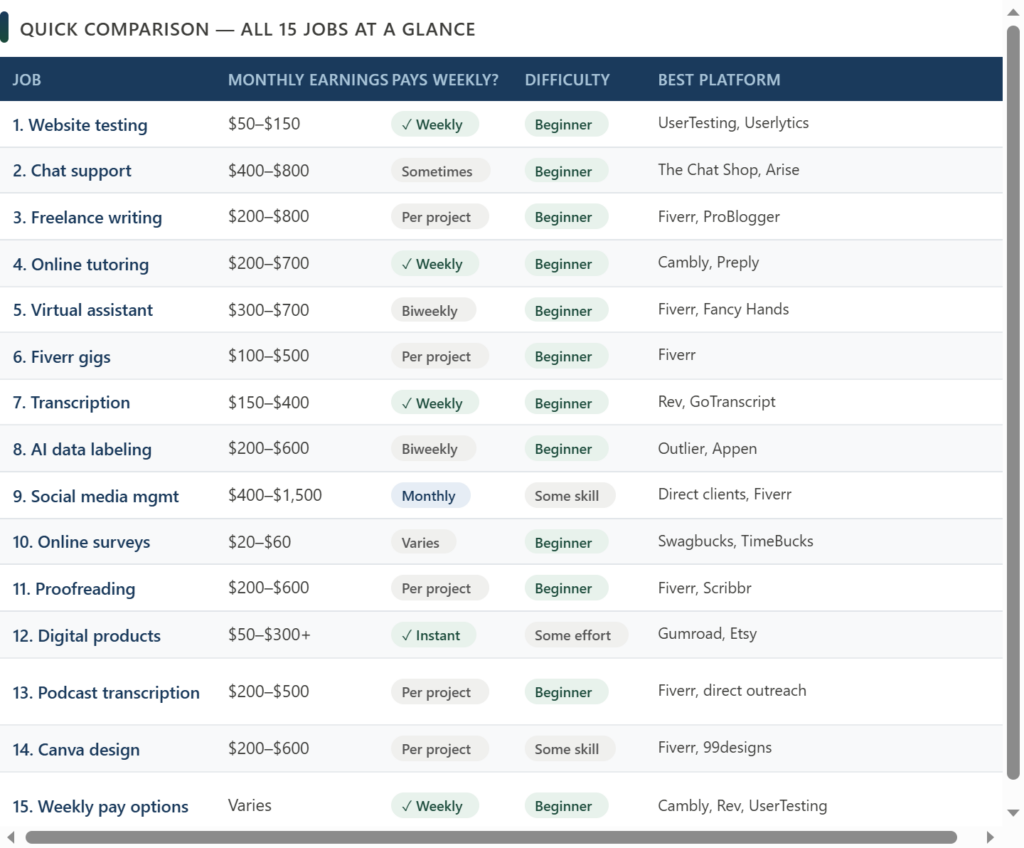
And if you’re still figuring out which online money-making path fits you best, check out our full guide on 15 Legit Online Jobs for Students With No Experience , it covers everything from surveys to full remote jobs, so you can find what works for your schedule and skills.
Disclosure: Some links in this article are affiliate links. If you sign up through them, we may earn a small commission at no extra cost to you. We only recommend platforms we genuinely believe in.
FAQs: Freelance Jobs For Beginners
What are the best freelance jobs for beginners with no experience? The best freelance beginner jobs with no experience are freelance writing, virtual assistant work, data entry, transcription, and social media management. These skills have low barriers to entry, don’t require a degree, and have consistent demand from clients on platforms like Fiverr and Upwork. If you’re a complete beginner, start with one of these before moving to higher-skill options like graphic design or video editing.
Can I do freelance beginner jobs from home? Yes, almost all freelance beginner jobs are fully remote. Whether you’re doing data entry, writing blog posts, managing social media, or working as a virtual assistant, everything happens online. All you need is a laptop and a reliable internet connection. This is exactly what makes freelancing one of the best options for students who want to earn money without leaving campus.
What are the easiest freelance jobs for students? The easiest freelance jobs for students are data entry, transcription, and web research, because they require minimal training and you can start almost immediately. If you want something with higher earning potential that’s still beginner-friendly, freelance writing and virtual assistant work are great next steps. The key is picking one skill and focusing on it rather than trying to do everything at once.
Fiverr or Upwork which is better for freelance beginners? For complete beginners, Fiverr is the better starting point. You create a gig, set your price, and wait for clients to come to you, no bidding, no proposals. Upwork is more competitive but pays higher rates and is better for landing long-term contracts. The ideal strategy is to start on Fiverr to build your first reviews, then expand to Upwork once you have a portfolio to show.
Are there freelance jobs for beginners that actually pay well? Yes. social media management, video editing, and freelance writing can all pay well even as a beginner once you have a few reviews and solid samples. Social media management in particular is one of the highest-paying freelance beginner jobs because clients pay monthly retainers rather than per project. As a student working part-time, hitting $500–$1,000/month within your first few months is a realistic goal if you stay consistent.
Let’s cut through the noise:you don’t need a degree, a fancy portfolio, or years of experience to start freelancing. You just need a skill, a platform, and a simple system to land your first client, then repeat the process and scale.
If you’re a beginner or someone completely new to online work, freelancing isn’t about getting rich overnight. It’s about turning downtime into income, building real-world skills, and creating a flexible side hustle that grows with you. In this guide, I’ll walk you through exactly how to make money freelancing for beginners, step by step. No fluff. No fancy promises. Just a clear, actionable roadmap that’s worked for thousands of beginners worldwide.
Why Freelancing Actually Works for Beginners (Yes, Even Students)
Most people think freelancing is for “experts.” Let me tell you the truth: That’s never true. Here’s why it’s a good choice for beginners -Low barrier to entry: You can start with free tools and zero upfront costs -Flexible hours: Work around classes, shifts, or study sessions –Skill compounding: Every project makes you faster, smarter, and more valuable –Global access: Platforms like Upwork and Fiverr accept clients and freelancers from 150+ countries Real talk: Freelancing won’t replace a full-time job in month one. But as a side hustle? It’s one of the most reliable ways to earn $50–$300/month while building a skill that pays for years.
our guide about Freelance Beginner Jobs will help you find your best gig with 0 experience, check it whenever you want!
Now let’s begin
Step 1: Pick a Beginner-Friendly Skill (No Experience Needed)
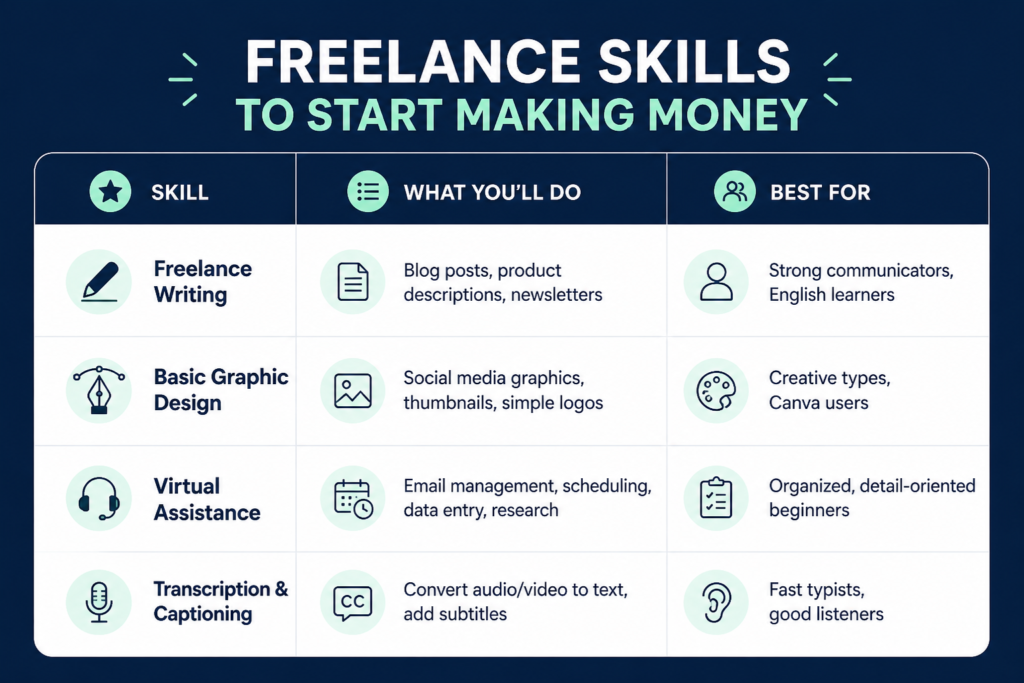
At the beginning don’t go after advanced skills or fancy stack. Start with skills that are in high demand, easy to learn, and highly repeatable. Top 4 Beginner-Friendly Freelance Skills
How to Learn Fast (Free Resources) Writing: HubSpot Academy (free content marketing course) Design: Canva Design School + YouTube tutorials VA/Ops: Notion tutorials, Trello basics, Gmail filters Transcription: TypeFaster (free typing trainer), Rev.com guidelines 💡Pro tip: Don’t spend months “studying.” Learn the basics, then learn by doing. Your first paid gig will teach you more than any free course, from here things compound faster!
Step 2: Set Up Your Free/Low-Cost Starter Kit
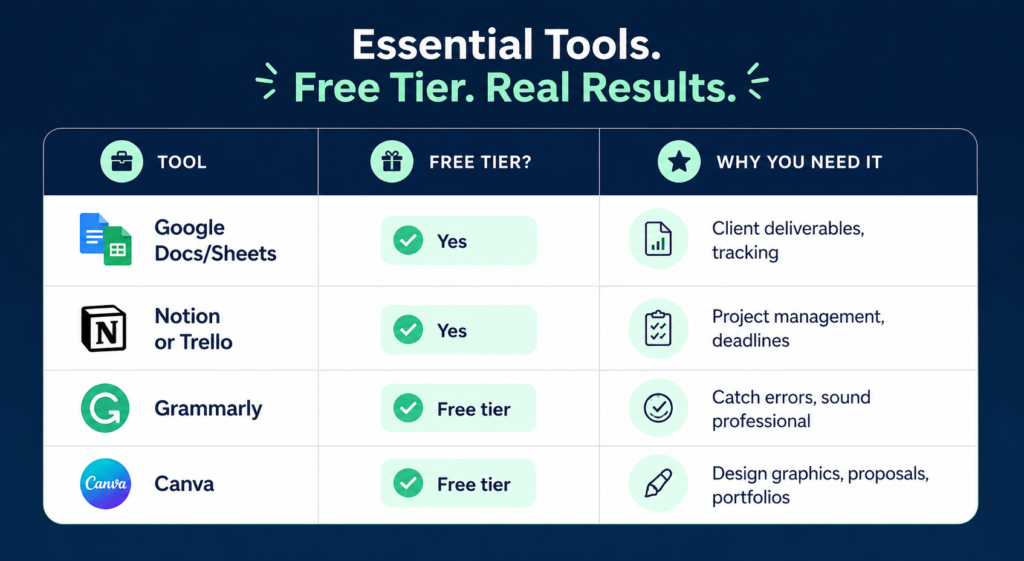
Being simple and deliver results will outweigh fancy but procastinate, as a beginner your main focus must be simple but works . Here’s the lean toolkit that actually works for freelancing beginners
Step 3: Choose the Right Platform for Your First Gig
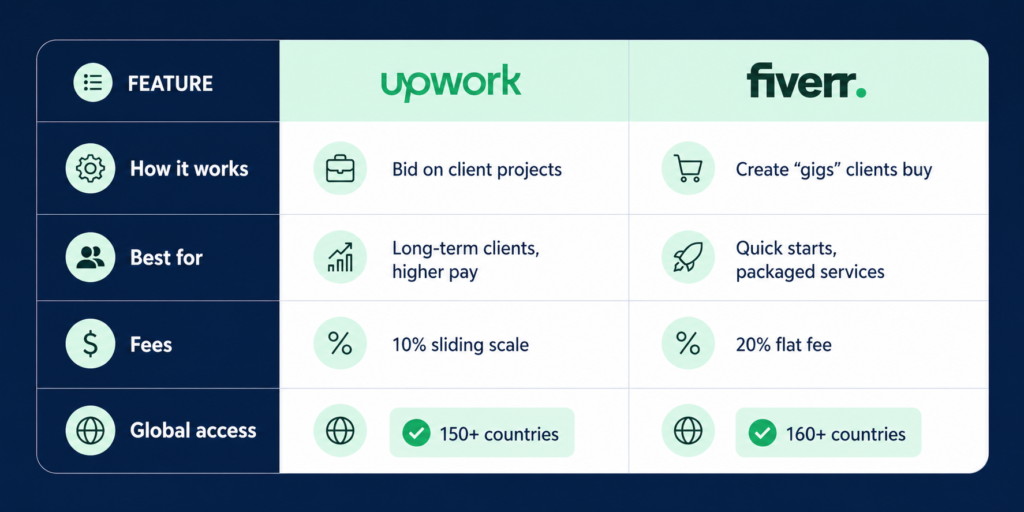
Two platforms dominate the beginner space: Upwork and Fiverr. Here’s how to pick:
Which Should You Start With? Choose Upwork if you want to build relationships, negotiate rates, and aim for $15–$30/hr within 3 months ChooseFiverr if you want to package your skill into a clear offer (e.g., “I’ll design 3 Instagram posts for $15”) and get your first sale faster. This comparison guide will help you choose: Fiverr vs Upwork which is better for beginners
Step 4: Land Your First Client (Even With Zero Portfolio)
This is where most beginners quit. Don’t. You don’t need past clients to prove you can deliver. You need proof of skill. ✅How to Build a “Spec Portfolio” in 48 Hours -Pick 3 sample projects (e.g., write a 500-word blog post, design 3 social graphics, organize a mock spreadsheet) -Save them as PDFs or link them in a free Google Drive folder -Add a simple header: “Sample Work- [Your Name]”
you may wanna check 10 AI side hustles for beginners to start #📝Profile Optimization Checklist Professional photo (clear, friendly, well-lit) Headline: “Beginner [Skill] Freelancer | Fast Turnaround | Detail-Oriented” Overview: 3 short paragraphs: who you help, what you do, why choose you Portfolio: Upload your spec samples Availability: Set to “More than 30 hrs/week” (adjust later) Proposal Template (Copy-Paste Friendly) Hi [Client Name], I saw you’re looking for [specific task]. I’ve worked on similar projects and can deliver [clear outcome] by [date]. I’ve attached 2 samples that match your needs. I’m happy to do a quick test task or jump on a 10-min call to discuss details. Looking forward to helping you get this done! Best, [Your Name]
NB: First goal isn’t profit. It’s a 5-star review. Price slightly below market ($10–$20 for first 2–3 gigs) to build momentum and eventually gain traction
Step 5: Get Paid & Avoid Beginner Scams
How Payments Work Upwork: Hourly (tracked via app) or fixed-price (released in milestones) Fiverr: Funds held until order complete → withdraw via PayPal, Payoneer, or bank Withdrawal time: 5–14 days depending on method & country 🌍 Global tip: If PayPal isn’t available in your region, Payoneer works in 150+ countries and integrates directly with both platforms. 🚩 Red Flags to Avoid 1-“Pay me to get hired” or “buy my training first” 2-Requests to communicate/pay outside the platform 3-Vague deliverables (“just make it look good”) 4-Unrealistic promises (“earn $500/day with no skills”)
Rule: If it feels sketchy, walk away. Platforms protect you when you stay on-site. Realistic Earnings: What You’ll Actually Make Let’s set expectations straight:
Freelancing compounds. Your first $20 gig teaches you how to deliver. Your fifth $50 gig teaches you how to negotiate. By month six, you can see real results because this is where massive growth shows up.
Ready to Start? Your Next 3 Steps 1-Pick one skill from Step 1 and spend 2 hours learning the basics 2-Create your spec portfolio (3 samples max) 3-Sign up on one platform and send 5 tailored proposals this week
Freelancing is not about talent or fancy portfolio, it’s about systemizing your process and being consistent.
FAQs: how to make money freelancing for beginners
How to make money on Freelancer as a beginner?
Start by creating a complete profile with a professional photo, a clear bio, and a portfolio, even if it’s sample work you created to demonstrate your skills. Choose one or two service categories to specialize in (writing, design, data entry, etc.) rather than offering everything. Bid on smaller, lower-competition projects first to build your review score, since clients heavily rely on ratings. Write personalized proposals that address the client’s specific problem rather than copying a template. Once you land 3–5 projects with positive reviews, you can gradually raise your rates and go after bigger contracts.
How to make $100 per day online?
Earning $100/day as a freelance beginner is achievable once you have a few reviews under your belt. For example, if you charge $25/hour, you only need 4 billable hours. Realistic paths include: writing 2–3 articles at $40–$60 each, doing virtual assistant work for 3–4 hours, completing small graphic design tasks, or handling social media for a local business. The fastest route is to pick a skill that’s in high demand (copywriting, video editing, web design) and target clients outside the major freelance platforms, like small business owners on LinkedIn or local Facebook groups , where competition is lower and budgets are often higher
How can I make $3,000 per day?
$3,000/day is a realistic ceiling for experienced, highly specialized freelancers, not a starting point. Professionals who reach this level typically offer high-value services like B2B copywriting, conversion optimization, fractional CMO work, or software development for enterprise clients. They usually get there by niching down deeply, building a strong portfolio with measurable results (e.g., “increased client revenue by 40%”), and charging project-based fees rather than hourly rates. As a beginner, treat this as a long-term goal: focus first on mastering one skill, collecting testimonials, and raising your rates every 3–6 months as your results improve.
Can I make $1,000 a month freelance writing?
Yes. $1,000/month is one of the most attainable early milestones for beginner freelance writers. At $0.10/word (a common entry-level rate), that’s about 10,000 words, or roughly 5–8 blog posts. At $0.15–$0.20/word (achievable after a few months), you’d need even less. To get there faster: pitch content agencies and marketing teams directly (they hire regularly), specialize in a niche like SaaS, finance, or health (niche writers earn more), and create a simple portfolio site with 3 writing samples. Most writers who commit consistently hit the $1k/month mark within 60–90 days.
Let’s be real for a second: most “make money with surveys” articles are garbage. They recommend US-only sites to a global audience or promise $500/month doing 5-minute surveys (spoiler: that’s not happening). For past 6 years i nearly have examined every survey app you could name, so here’s what’s different about this list: every platform below actually works worldwide, tested and has earned its place on my list, has a proven payout system, and is beginner-friendly enough that you can start earning today-even if you’ve never done online work before. Will you get rich doing surveys? short answer: No. Can you make an extra $20–$100/month in your spare time as a complete beginner? Absolutely.
DISCLOSURE: This post contains affiliate links. If you sign up through our links, we may earn a small commission at no extra cost to you. We only recommend platforms we’ve researched and trust. Thanks for supporting hustlepaynow.com!
After all of that was said my friend, let’s get into it
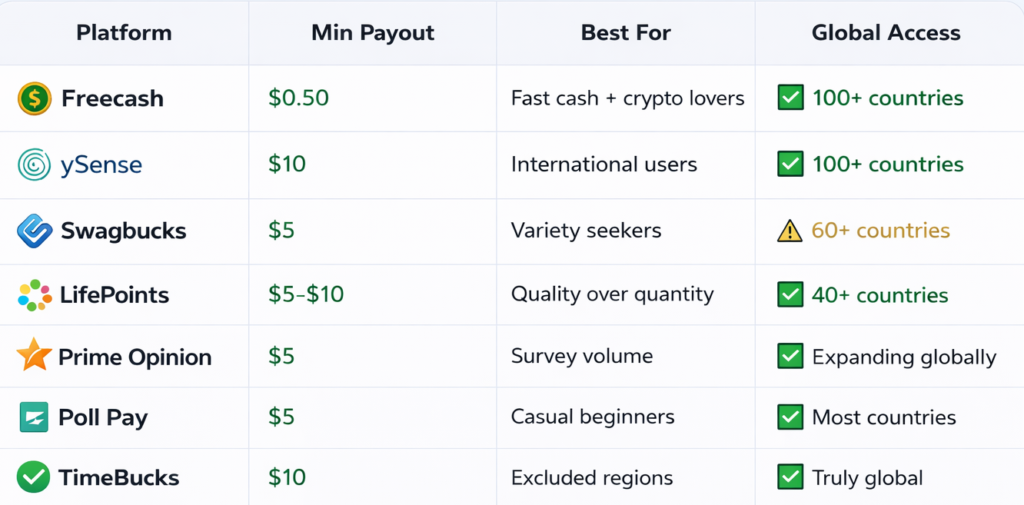
1. Freecash
What Is It?
Freecash is one of the fastest-growing reward platforms that pays you for surveys, app testing, game trials, and simple tasks. It’s gained serious traction because of its low $0.50 minimum payout and instant withdrawal options.
How You Earn:
-Complete surveys (5–20 minutes each)
-Test mobile apps and games
-Watch short videos or offers
-Daily login bonuses
Pay Range:
Surveys: $0.30–$3 each
App/game offers: $0.50–$15+ (higher payouts for reaching game levels)
Realistic monthly earnings: $15–$80 for casual users
Payout Options: PayPal, Bitcoin, Ethereum, Litecoin, gift cards (Amazon, Steam, Google Play)
Best For: Those who want flexible, instant payouts — especially if you’re into crypto or need quick cash via PayPal. The low minimum means you’re not waiting weeks to access your earnings.
Formerly known as ClixSense, ySense has been around since 2008 and is one of the most trusted names in the survey space. It’s particularly strong for users outside the US/UK, offering consistent survey availability in 100+ countries.
How You Earn:
Paid surveys (screeners are clearly shown)
Daily tasks and offers
Referral program (earn when friends join)
Pay Range:
Surveys: $0.50–$5 each
Tasks: $0.10–$2
Realistic monthly earnings: $20–$100 depending on your country and time invested
Payout Options:
PayPal, Payoneer, Skrill, gift cards
Best For: ySense consistently delivers survey opportunities across Asia, Africa, Latin America, and Europe. Making solid option for guys from all around.
What Is It? Swagbucks is the giant of the rewards world, with over 20 million members and $500+ million paid out. While it’s strongest in the US, UK, Canada, and Australia, it’s expanding globally. What sets it apart: you’re not limited to just surveys.
Realistic monthly earnings: $10–$150 (higher if you combine surveys + shopping)
Payout Options:
PayPal, gift cards (Amazon, Walmart, Visa prepaid)
Best For:
Beginners who want variety and don’t want to stare at surveys all day. If you’re already shopping online or watching videos, Swagbucks lets you monetize those habits.
What Is It? LifePoints is a well-established survey panel (part of the Lightspeed Research network) with strong Trustpilot reviews and a reputation for fair treatment of members. It’s available in 40+ countries and focuses on quality over quantity.
How You Earn:
Market research surveys (10–20 minutes average)
Product testing opportunities (select users)
Referral bonuses
Pay Range:
Surveys: $0.50–$4 each
Realistic monthly earnings: $15–$75 (depends on your demographic profile)
Payout Options:
PayPal, gift cards (Amazon, iTunes, Google Play), bank transfer (select countries) Minimum payout: $5–$10 (varies by region)
Best For: If you’d rather do fewer, higher-quality surveys than grind through low-paying ones, LifePoints is a solid pick.
5. Prime Opinion-Best for High Survey Volume
What Is It?
Prime Opinion is a newer player that’s gaining ground fast, especially for its clean interface and beginner-friendly onboarding. It focuses heavily on survey volume, meaning more opportunities to earn compared to some older platforms.
How You Earn:
Paid surveys (10–25 minutes average)
Daily bonuses and streaks
Level-up rewards (earn more as you complete surveys)
Pay Range:
Surveys: $0.50–$4 each
Daily bonuses: $0.10–$0.50
Realistic monthly earnings: $20–$90
Payout Options:
PayPal, cryptocurrency, gift cards Minimum payout: $5
Best For: Beginners who want a modern, no-nonsense platform without the clutter of older sites. The leveling system keeps things gamified and rewarding.
6. Poll Pay-Quick, Simple Surveys
What Is It?
Poll Pay is a straightforward survey app that focuses on speed and simplicity. No complex offers, no game trials — just surveys. It’s available globally and works well for users who want a “set it and forget it” earning method.
How You Earn:
Short surveys (1–5 minutes typical)
Occasional longer surveys (10–15 minutes)
Referral program
Pay Range:
Surveys: $0.20–$2 each
Realistic monthly earnings: $5–$40 (lower ceiling, but very low effort)
Payout Options:
PayPal, gift cards Minimum payout: $5
Best For: Absolute beginners or casual users who want zero learning curve. If you just want to answer a few questions while watching Netflix, Poll Pay is your go-to.
7. TimeBucks-Best for Truly Global Access
What Is It?
TimeBucks is one of the few platforms that genuinely works everywhere — including countries often excluded like Nigeria, Pakistan, India, and the Philippines. It’s not just surveys; it’s a full microtask platform.
How You Earn:
Surveys
Watching videos
Social media tasks (liking, following)
Clicking ads
Referrals (10% commission)
Pay Range:
Surveys: $0.20-$2
Tasks: $0.01-$0.50
Realistic monthly earnings: $10-$60 (varies heavily by country)
Payout Options:
PayPal, cryptocurrency, bank transfer (country-dependent) Minimum payout: $10
Best For:
Users in countries that are often excluded from other platforms. If you’ve been frustrated by “not available in your region” messages, TimeBucks is your answer.
Real Talk: How to Actually Make This Worth Your Time Here’s the truth no one tells you: survey apps alone won’t change your financial life. But used strategically, they can:
> Cover your phone bill or Netflix subscription > Build your first $50–$100 emergency fund > Give you “fun money” without asking parents > Teach you the basics of online earning
My Recommendation for Beginners:
1-Start with 2 platforms max (I suggest Freecash + ySense for global users) 2-Set a time limit (30–60 minutes/day max, don’t let it eat your time) 3-Cash out early and often (build trust in the system) 4-Reinvest your first $50 into learning a higher-paying skill (writing, creatives, coaching, design, etc.)
This what it is, and this how you should treat it my friend!
FAQs about how to make money with surveys websites:
Can I really make money with survey apps as a beginner?
Yes, but set real expectations. Beginners make $10–$50/month casually. It’s pocket money, not rent money.
Do these apps work in [my country]?
All 7 platforms above have global access, but survey availability varies. ySense, Freecash, and TimeBucks are your safest bets for non-US/UK users
How do I avoid survey disqualifications?
Complete your profile 100%, be honest about demographics, and don’t rush through screeners. Disqualifications happen-it’s normal.
Are these apps safe and legit?
Yes, all platforms listed have proven payout histories and positive user reviews. Never pay to join a survey site-that’s always a scam.
Artificial intelligence is changing how people work online (how we make money online) and Tasks that used to take hours can now be done in minutes with the right tools on hands. Because of this, AI side hustles for beginners are becoming one of the easiest ways to start making money online. Even more some tech-involved faces have said this AI era is probably the golden opportunity to build generational fortune! so hear me out we have to make advantage of this and eventually we may come to realize financial independence and live that life we chase.
The good news guys? You don’t need to be a programmer or an AI-engineer or a tech expert to get started on these, With the right AI tools-I will recommend for each side hustle- and a bit of creativity, you can start offering services, creating digital products, or helping businesses automate tasks or establishing other different business models we will explore today and eventually succeed your business thanks to AI.
Many students, freelancers, professionals and beginners are already leveraging power AI tools to make money through simple online services or products
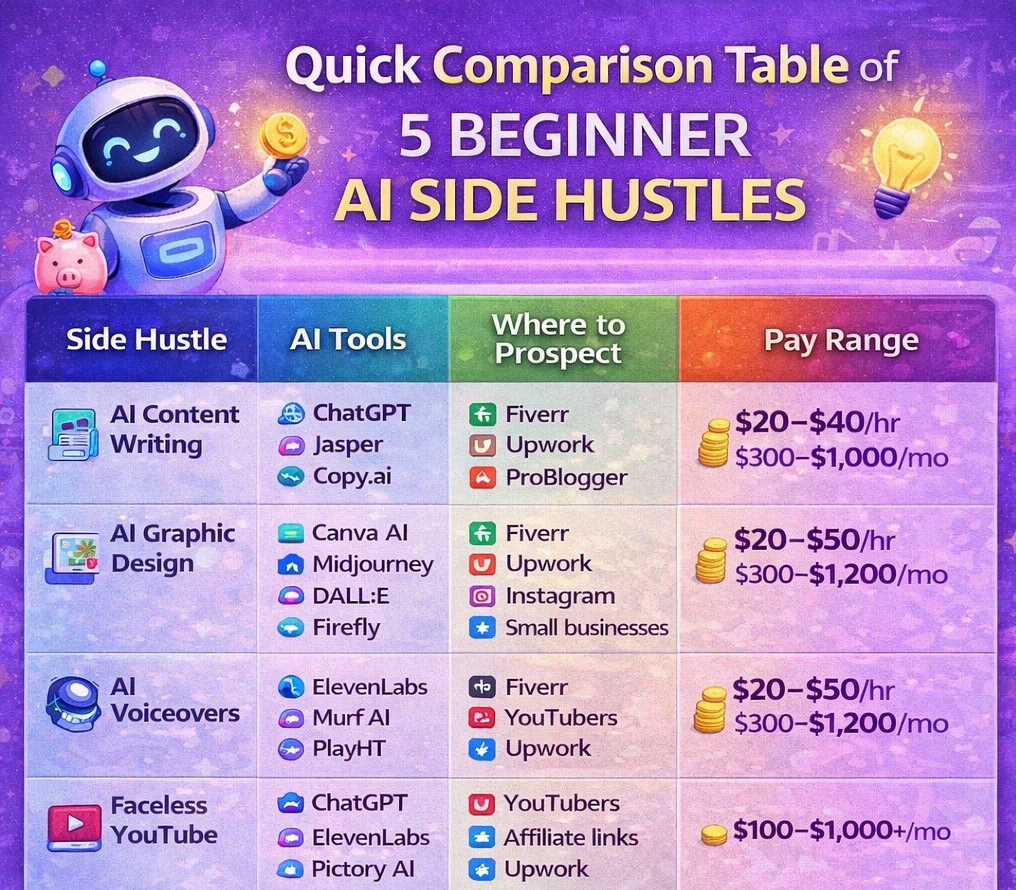
In this guide, you’ll discover 10 beginner AI side hustles you can start in 2026, including:
What each side hustle is
How it works
The AI apps and tools to use
Where to find clients or customers
Whether you’re looking for AI online jobs or simply exploring the best AI side hustles, this list will help you decide on what to start and how to intentionally get started and make some good money all with the tools we will look at plus where you can search for prospects or sell your service; Let’s get into it
1. AI Content Writing
What it is
AI content writing means using AI tools to help create blog posts, product descriptions, social media captions, or website content for clients. But don’t try to outsource your creativity, we’re making AI does the exhausting repetitive tasks and not to think for us. This is critical as some people use generic content (copy-paste) then wondering why it does not make sense and actually get results.
Many businesses need content but don’t have time to write it themselves. Your move is to offer your service and showcase AI as a speed/efficiency booster and is not the engine of that service.
How it works
You use an AI writing tool to generate drafts, then edit and improve them before delivering them to the client.
Facebook/Reddit entrepreneur groups-this one i can tell is so underrated
This is one of the best AI side hustles because businesses constantly need content.
2. AI Graphic Design Services
What it is
AI graphic design uses AI tools to quickly create logos, social media posts, and marketing graphics. Many small businesses want affordable designs or they want quick some body to handle the heavy work for them and here you come
How it works
You generate design ideas using AI and customize them before sending them to the client.
This is a great AI online job if you enjoy creativity.
3. AI Voiceover Creation
What it is
AI voice tools can generate realistic voiceovers (it’s true that is not like human quality/relevance but it’s evolving) for videos, ads, podcasts, and online courses. Businesses and content creators need voiceovers but often don’t want to record them themselves, means you can get to use a voice generator tool or a voice cloner to stay relevant.
How it works
You write the script and generate the voice using AI software.
AI tools you can use
ElevenLabs
Murf AI
PlayHT
Where to find clients
Fiverr
YouTube creators
Podcast producers
Upwork
Many YouTubers are already using this method to make money with AI.
4. Faceless YouTube Channels with AI
What it is
Faceless YouTube channels are channels where you don’t show your face. AI can help with content ideas, scripts, voiceovers, and even video creation.
How it works
AI tools generate the script, narration, and visuals for your videos. You upload them and earn from ads or affiliate links.
AI tools you can use
ChatGPT (scripts)
ElevenLabs (voice)
Pictory AI (video creation)
CapCut AI
How to monetize
YouTube ad revenue
Affiliate marketing
Sponsorships
This is one of the most scalable AI tools to make money online, plus it’s considered the bright future of content creation
5. AI Resume Writing Services
What it is
Many people and job searchers struggle to write strong resumes (and that’s the pain point you can utilize to position your service as the go-to). You can use AI tools to help create professional resumes for job seekers, but here’s the thing you are not just writing their resume you are architecting that strong piece they need to boost their chances.
How it works
Clients provide their information, and you use AI to generate a well-structured resume. Then you edit it to match their needs and the job they want.
AI tools you can use
ChatGPT
Resume.io AI tools
Kickresume
Where to find clients
Fiverr
LinkedIn
Upwork
College career groups
Targeted FB/Reddit groups (graduation, careers..)
This is a simple but powerful beginner AI side hustle. The additional value is that you know better about prompting which means maximum output quality. But if you don’t know about oriented prompting you can simply ask ChatGPT to guide you about what you want then you extract the goated prompt with controlled context, constraints, goal and other details.
6. Selling AI Prompts
What it is
Prompts are instructions used to guide AI tools to produce specific outcomes. As we said before it’s all comes to power of positioning because if two guys prompted about the same outcome guess who gets the best result? YES it’s the one who engineers his prompt Good prompts save people time and improve results, fortunately 99% miss on this=opportunity for you.
How it works
You create high-quality customizable prompts for tasks like writing, marketing, design, productivity, ect.. Then you sell them online to those who don’t know what a good prompt is! simple.
AI tools you can use
ChatGPT
Midjourney
Claude
Where to sell prompts
PromptBase
Gumroad
Etsy
Many creators are making money by selling AI prompts as digital products.
7. AI Social Media Management
What it is
Businesses (local or digital) need help managing their social media accounts. AI tools can help schedule posts, generate captions, and analyze performance.
How it works
You create content plans and use AI to generate posts quickly.
AI tools you can use
ChatGPT
Canva AI
Hootsuite AI
Buffer
Where to find clients
Local businesses
Upwork
Fiverr
LinkedIn
This is one of the best AI side hustles for people who enjoy social media.
8. AI Digital Product Creation
What it is
Digital products include templates, planners, guides, and e-books… AI tools can help generate ideas and content quickly, help in structuring, visuals and eventually with marketing and that’s exactly what fast-growing businesses are betting one ‘AUTOMATION’. Automating processes and workflows is the future of digital world.
How it works
You create a useful digital product that solves a problem for a group of people and sell it repeatedly.
AI tools to help you
ChatGPT
Canva AI
Notion AI
Where to sell
Etsy
Gumroad
Shopify
Own store
This method can scale to a passive income AI side hustle as you gain some good understanding of humans avatar and automation which helps solve more problems=more money in your pocket.
9. AI Chatbot Setup for Businesses
What it is
Many businesses now use chatbots to answer customer questions automatically. You can help businesses set up these chatbots. It does not need to be complicated as we said we will be using the appropriate AI tools to help build that for us while you focus 80% of your effort on distribution and finding your potential prospects.
How it works
You create automated responses and connect the chatbot to the business website with help of an integration app which makes your mission seamless and efficient,
AI tools to use
ChatGPT API
ManyChat
Tidio AI
Where to find clients
Local businesses
LinkedIn outreach
X outreach (communities or in-person)
Upwork
Businesses love automation because it saves time and money.
10. AI Thumbnail Creation
What it is
YouTube creators need eye-catching thumbnails to increase clicks, and that’s the pain point we will be amplifying while marketing your service+your ability to write high-quality prompts= high-quality thumbnails and recurring clients. The good AI tools combination can help create thumbnails faster and better which means by time you can mange 2-3 projects at the same time as you become experienced and recommended by clients.
How it works
You generate design concepts and customize them to match the video topic.
AI tools you can use
Canva AI
ChatGPT
Midjourney
Photoshop AI
Where to find clients
YouTube creators
Fiverr
Upwork
Content creator communities
This is a fast-growing AI online job because video content keeps increasing.
Final Thoughts: Are AI Side Hustles Worth Starting?
AI is opening many new opportunities online. And those who have tools+creative brain and learn how they can position their services the way their client needs to see it will make decent money out of AI. If you’re a beginner, these AI side hustles for beginners can help you start earning without advanced technical skills.
The key is simple:
Pick one idea
Learn the tools
Start offering value to clients
Many people are already using AI tools to make money online-and the opportunities are still growing as more AI tools appear and the capabilities are being expanded. It’s real that it s never been easier to create a profitable business than now, and it’s all can be built and maintained from the comfort of your house. You will find difficulties when just getting started (tools, management, competition, experience..) especially if you re starting from 0 experience and/or budget, but that’s normal because AI is now accessible by the whole world making consistency and labor the core factors for a successful business.
FAQs: AI side hustles for beginners
What are the best AI side hustles for beginners in 2026?
Some of the best AI side hustles for beginners include AI content writing, AI graphic design, AI voiceover creation, AI social media management, AI thumbnail design, and selling AI prompts. These beginner AI side hustles require minimal experience and can be started using popular AI tools like ChatGPT, Qwen AI, Canva AI, ElevenLabs and others.
Can beginners really make money with AI?
Yes, beginners can absolutely make money with AI by offering simple services online. Many freelancers use AI tools to write content, design graphics, create voiceovers, or manage social media accounts. With practice and consistency, AI side hustles for beginners can generate extra monthly income or even grow into full-time online businesses
How much can you earn from AI side hustles?
Earnings from AI side hustles for beginners vary depending on the service and experience level. Some beginners earn around $100–$500 per month at first, while experienced freelancers offering AI services can earn $1,000 or more monthly through multiple clients or digital product sales.
Are AI online jobs safe and legitimate?
Yes, many AI online jobs are legitimate, especially when working through trusted freelance platforms like Fiverr, Upwork, or Freelancer. The key is to offer real value to clients and use AI as a tool to improve productivity rather than trying to outsource your service and relying entirely on automation.
Do AI side hustles require coding or technical skills?
Most AI side hustles for beginners do not require coding or advanced technical knowledge. Many AI tools are designed with simple interfaces, allowing users to generate content, images, or audio with basic prompts. Learning how to use these tools effectively is often enough to start offering beginner AI side hustles online.
Which AI side hustle is the easiest to start?
AI content writing and AI graphic design are often considered the easiest beginner AI side hustles to start. These services are in high demand and require minimal setup. With tools like ChatGPT and Canva , beginners can quickly create content or visual designs for clients
Are AI side hustles sustainable long-term?
Yes, AI side hustles for beginners can become long-term income streams if you focus on providing value and improving your skills. As AI continues evolving, businesses will need people who understand how to use AI tools effectively for marketing, content creation, and automation
If you’re a college student like me then you’ve probably asked yourself this question at least once: Are side hustles worth it for students — or are they just overhyped online?
You see videos on social media of students or teenagers making money from freelancing, drop-shipping, SMMA, selling online, or working from their laptop. But at the same time, you worry about:
Time
Stress
Tuition
Grades
Burnout
….
Take it easy my friend. I’ve been there, that’s why i have written this article.
Today we’ll break everything down slowly and honestly, no hype, no fake promises. We’ll look at the pros, cons, and realistic earnings so you can decide if a side hustle is actually worth it for you before you give anything in advance.
Just one thing before we get started If you’re still exploring options, I’ve already shared a list of legit side hustles for students that actually pay, but here we’ll focus on whether they’re worth your time.
Let us get in guys;
Why College Students Even Consider Side Hustles
Most students don’t start side hustles “for fun.” unfortunately we do it because:
Tuition and living costs are high
Part-time jobs don’t pay enough
Schedules are tight
We want independence
Side hustles promise flexibility and some real money. But promise alone isn’t enough because we want real numbers and results,
FAQs: Are Side Hustles Worth It for College Students?
❓ Are side hustles worth it for students?
Yes, side hustles are worth it for students who choose flexible options and have realistic expectations. A side hustle can provide extra income, useful skills, and work experience, but it requires time, patience, and consistency to see results.
❓ What are the pros and cons of side hustles for college students?
The main pros include extra income, flexible schedules, and skill development. The cons include time pressure, slow earnings at the beginning, and the risk of burnout. Understanding the side hustles for college students pros and cons helps you decide if it fits your lifestyle.
❓ How much money can college students realistically earn from side hustles?
Most college students earn between $100 and $500 per month when starting out. With experience, student side hustle income can grow to $1,000 or more per month, depending on the type of work and time invested. These are realistic side hustle earnings, not guaranteed results.
❓ Do side hustles affect college grades?
Side hustles can affect grades if time is not managed properly. However, many students successfully balance both by working only a few hours per week and choosing flexible online side hustles.
❓ What are the best side hustles for college students?
The best side hustles for college students are flexible, low-cost, and skill-based. Popular options include freelance writing, virtual assistant work, online tutoring, selling digital products, and other online side hustles that fit around class schedules.
❓ Are online side hustles safe for college students?
Yes, online side hustles are safe when students use trusted platforms and avoid offers that ask for upfront fees. Always research platforms and read reviews before starting.
❓ How many hours should a college student spend on a side hustle?
Most students spend 5–10 hours per week on a side hustle. This amount allows you to earn extra money without harming your studies or mental health.
If you’re a student looking for online work, chances are you’ve already seen promises like “make $5,000 a month with no skills.” or “start making +$10k/month with this easy online jobs” and more like this In reality-most of that is noise or an opportunity for some losing scammers out there!
The starting point: there are legit online jobs for students with no experience, but you need to know where to look and what to actually expect.
For that sake I have written this article where I’ll be walking you through real online jobs you can start from home, even if:
You’ve never worked online before
You’re a college or university student
You only have a few hours per week
No hype. Just practical options that actually work for students and beginners;
BONUS; I will be sharing some options that pay weekly means you can make good money by the end of this week.
DISCLAIMER; 1- the websites/platforms mentioned here are standard examples but availability can vary from country to country.
Disclosure: some links below are affiliate links means we may earn a small commission if you clicked them at no extra cost to you.
First thing first lets be clear about the word ‘experience’..
What “No Experience” Really Means for Online Jobs
When I say online jobs for students with no experience, I don’t mean:
Zero effort
Zero learning
Instant high income
What it does mean:
No degree required
No professional background needed
No advanced or fancy skills upfront
Most of these jobs train you on the go which means you gain the experience as you are working, or sometimes rely on basic skills you already have, like typing, reading, communicating, or following instructions.
1. Website and App Testing
Ever wished someone would pay you to click around a website? That’s literally what this job is.
Companies need real people (not developers ) to test their websites and apps before launch. You visit the site, complete a set of tasks, and record your screen while sharing your thoughts out loud. No technical skills needed. Just an honest opinion and a working computer.
Realistic earnings: from $10 and up to $30 per test , $50–$150/month part-time Payment frequency: Weekly (PayPal) Best for: Complete beginners-no experience, no interview, no skills required
This won’t replace a salary, but it’s one of the easiest ways to make your first $10 online today ,literally within hours after signing up.
2. Online Chat Support (No Calls, No Phone)
If the idea of a phone job stresses you out, this is your alternative. Online chat support agents help customers through live text chat ;no voice, no calls, ever.
Companies hire remote chat agents to answer questions, resolve simple issues, and guide customers through their products. You get a script to follow, training is provided, and most shifts are flexible enough to work around classes.
Realistic earnings: $12-$18/hour , $400-$800/month part-time Payment frequency: Biweekly or weekly depending on employer Best for: Students with good written communication skills
Remote.co job board with regular chat support listings
One honest note: these roles are more competitive than survey jobs. Write a clean, professional application and highlight any customer-facing experience, even informal ones.
3. Freelance Writing (Beginner-Friendly Niches)
Freelance writing is the highest-income-potential job on this list for beginners. If you can write a clear, structured sentence, you already have the core skill. The rest is practice.
Businesses, blogs, and content agencies constantly need writers for articles, product descriptions, social captions, and email newsletters. Most don’t require a degree ,they require deadlines met and decent grammar (even if your grammar isn’t solid i have a good tool to help you)
Realistic earnings: $15-$50 per article starting out , $200-$800/month once established Payment frequency: Per project (most clients pay within 7-14 days) Best for: Students comfortable writing in English
Best beginner niches to start in (low competition, high demand):
Product descriptions for e-commerce stores
Blog posts for small businesses or creators
Social media captions
Email newsletters
Listicle articles (exactly like this one you re reading)
Textbroker good for complete beginners, steady work
Start on Fiverr or Textbroker, build 3-5 writing samples, then move to higher-paying direct clients. This is a real career path, not just a side hustle. Create you profile on Fiverr safely from here.
4. Online Tutoring (No Degree Required)
You don’t need a teaching degree to tutor online. You just need to know something better than the person you’re teaching, which, as a student, you almost certainly do.
English conversation tutoring is the single easiest entry point. Millions of non-native English speakers worldwide pay per hour for practice conversations with native or fluent speakers. No lesson plans, no curriculum. Just talk.
Realistic earnings: $10-$25/hour for beginners , $30-$50/hour once you have reviews Payment frequency: Weekly on most platforms Best for: Students fluent in English or strong in any academic subject
Best platforms to start without a degree:
Cambly English conversation only, hire same day, pay weekly
Cambly is the easiest starting point ,no interviews, no experience needed, and they pay every Monday via PayPal.
5. Virtual Assistant (Beginner Tasks)
A virtual assistant (VA) is someone who helps a business owner or entrepreneur with tasks they don’t have time for. As a beginner, you don’t need advanced skills, you need to be organized, reliable, and comfortable with basic digital tools.
Most beginner VA tasks involve things you likely already do every day: managing emails, scheduling appointments, doing research, or updating spreadsheets.
Realistic earnings: $12-$20/hour , $300-$700/month part-time Payment frequency: Weekly or biweekly, depending on client Best for: Organized students comfortable with Google Workspace or Microsoft Office
Common beginner VA tasks (no advanced skills needed):
Fancy Hands micro-tasks for VAs, great for starting out
Upwork larger platform, more competitive but higher pay
Once you build a relationship with one good client, referrals come naturally. Many VAs go from $15/hour to $30+/hour within 3-6 months.
6. Selling Gigs on Fiverr (Simple Digital Services)
Fiverr is a marketplace where you offer a service we call a “gig” and buyers come to you. You don’t need to pitch anyone, cold email anyone, or build a following. You create the gig, optimize it, and wait for orders.
The key insight most beginners miss: you don’t need rare skills. You need skills that busy people would rather pay someone else to do.
Realistic earnings: $5-$50 per gig , $100-$500/month with consistency Payment frequency: 14 days after order completion (7 days once you level up) Best for: Students with any creative, writing, or digital skill
Best beginner gigs that actually sell:
Logo design using Canva (no design degree needed)
Writing bios, about pages, or LinkedIn summaries
Transcribing audio or video files
Creating simple social media graphics
Proofreading or editing short documents
Making short video intros using templates
How to stand out as a new seller:
Use a clear, keyword-rich gig title
Offer a fast delivery time (1-2 days) , beginners win on speed
Price low at first ($5-$15) to get your first 5 reviews, then raise your rates
Transcription means listening to audio or video recordings and typing out what you hear. Medical and legal transcription requires training, but general transcription ,interviews, podcasts, meetings is completely beginner-friendly.
If you type reasonably fast (40+ words per minute) and have good listening skills, you can start today.
Realistic earnings: $0.45-$1.10 per audio minute or $150-$400/month for part-time Payment frequency: Weekly (most platforms pay via PayPal every Thursday) Best for: Students with good typing speed and attention to detail
Take the free typing test at typingtest.com before applying. Most platforms require 40–60 WPM minimum. If you’re below that, 30 minutes of daily practice will get you there within a week.
8. AI Training and Data Labeling
This is one of the fastest-growing beginner online jobs right now, and most students have never heard of it. AI companies need humans to train their models (labeling images, rating AI responses, writing examples, and evaluating content quality).
It’s flexible, pays decently, and requires zero technical background. You just need good judgment and attention to detail.
Realistic earnings: $10-$20/hour or $200-$600/month part-time Payment frequency: Weekly or biweekly Best for: Any student, no skills required, just consistency
Best platforms for AI training work:
Outlier.ai one of the highest-paying AI data platforms
Tasks vary widely, some days you’re rating chatbot responses, other days you’re labeling images or writing short stories for AI training. It keeps the work interesting.
9. Social Media Management for Small Businesses
Small business owners – local restaurants, coaches, boutiques – know they need a social media presence but have no time to manage it. That’s your opportunity.
As a beginner social media manager, you handle content scheduling, basic graphic creation (Canva), caption writing, and sometimes engagement (replying to comments). You don’t need a marketing degree — you need to understand how platforms work, which as a student, you almost certainly do better than your potential clients.
Realistic earnings: $200-$500/month per client or $400-$1,500/month with 2/3 clients Payment frequency: Monthly retainer (paid upfront or at month start) Best for: Students active on Instagram, TikTok, or Facebook
How to land your first client:
Offer to manage one local business’s Instagram for free for 30 days
Show results (follower growth, engagement rate)
Use that as your case study to charge the next client $200-$300/month
Google Analytics or native platform insights for tracking results
This is one of the few jobs on this list with real scalability. Three clients at $300/month = $900/month while still in school.
10. Online Surveys and Microtasks
This is the most well-known beginner online job-and the most misunderstood. Surveys won’t make you rich, but they’re genuinely useful as a starting point while you build skills for higher-paying options.
The realistic approach: sign up for 2-3 platforms, spend 20-30 minutes daily, and treat it as pocket money while you work toward something better on this list.
Realistic earnings: $20-$60/month (not per week) Payment frequency: Varies, most pay within a few days of reaching the minimum threshold Best for: Students who want to start earning immediately with zero setup
Honest take: Use surveys to earn your first $20 online and build the confidence that this is real. Then move your energy to jobs #1–9 on this list where the real income is.
11. Proofreading and Editing
If you have a strong eye for grammar, punctuation, and clarity, proofreading is a natural fit. Businesses, bloggers, students, and authors all need someone to catch errors before they publish.
This is different from freelance writing, you’re fixing existing text, not creating new content. It’s often easier to start with because the structure is already there.
Realistic earnings: $15-$30/hour or $200–$600/month part-time Payment frequency: Per project, usually within 7–14 days Best for: Detail-oriented students with strong grammar skills
Take the free proofreading practice test at Knowadays before applying anywhere, it improves your accuracy and gives you something to reference in applications.
12. Selling Digital Products (Notion Templates, Guides, Printables)
This is the only option on this list with true passive income potential. You create a digital product once and sell it repeatedly, no shipping, no inventory, no client management.
Notion templates are particularly popular with students right now. Study planners, habit trackers, budget templates, if you use Notion yourself, you’re already qualified and ready to help others.
Realistic earnings: $50–$300/month once established (can scale much higher) Payment frequency: Instant payouts on most platforms Best for: Creative, organized students willing to invest time upfront
The startup time is higher than other jobs on this list, but once a product is live, it earns while you sleep.
13. Transcribing for Podcasts and YouTube Creators
Content creators – YouTubers, podcasters, course creators – need their audio transcribed for subtitles, blog posts, and SEO. This is a more specialized version of transcription (job #7) with a more direct client relationship and often better pay.
Realistic earnings: $20-$60 per hour of audio or $200-$500/month part-time Payment frequency: Per project, usually within 7 days Best for: Students who consume a lot of video/podcast content
How to find these clients:
Search YouTube for mid-size channels (50K–500K subscribers) in niches you know
Reach out via email offering to transcribe one video for free as a sample
List the service on Fiverr targeting “podcast transcription” and “YouTube transcription”
This is also a great networking play, working directly with creators often opens doors to other opportunities like editing, writing, or VA work.
14. Beginner Graphic Design (With Canva)
You don’t need Photoshop or a design degree. Canva has made basic graphic design accessible to anyone with a good eye for what looks clean and professional.
Businesses, bloggers, and social media managers constantly need social media graphics, presentation slides, logos, thumbnails, and marketing materials, and many are willing to pay someone else to make them.
Realistic earnings: $15-$50 per design, $200-$600/month part-time Payment frequency: Per project Best for: Students with a visual eye and patience for detail
Build a portfolio of 5-10 sample designs on Canva before you start applying. You don’t need paid work to create samples, because you can make them for fictional brands if needed.
15. Legit Online Jobs That Pay Weekly-Quick Options
Looking specifically for jobs with weekly payouts? These 3 options from the full list above stand out for their consistent weekly payment schedules:
Cambly (tutoring) pays every Monday, no experience needed, start same day Rev (transcription) pays every Thursday via PayPal UserTesting (website testing) pays 7 days after each approved test
👉 For the complete breakdown of online jobs that pay every week, including platforms, minimum payouts, and payment methods, see our full guide: Legit Online Jobs That Pay Weekly
Table of comparison; best online jobs for students with no experience
How to Choose the Right Online Job as a Student
As i tell you guys always if you’re unsure where to start, just ask yourself:
How many hours per week can I work?
Do I want fast payouts or higher long-term income?
Do I prefer repetitive tasks or interactive work?
The answer will make it intentional and logic-driven to choose what fits you the the best;
Let me tell you that there are many online jobs for students with no experience that are legit, flexible, and realistic. You won’t get rich overnight, but you can earn consistent income from home while studying.
The rule for growth is unshakable: you Start small. Stay consistent. Learn as you go. never wait for perfect moment or conditions to start your journey..
Frequently Asked Questions
How to make $1000 in a week from home?
Making $1,000 in a week from home is possible but requires combining multiple income streams. Freelance writing, virtual assistant work, and online tutoring can each generate $200–$500 weekly. Add transcription and website testing on top. Realistically, beginners should target $200–$500/week first and scale from there as they gain experience and clients.
Can I get a job if I am 14?
Yes. Several online platforms accept workers aged 14 and above. Website testing on UserTesting, selling digital products on Gumroad, and completing microtasks on platforms like Swagbucks are all available to 14-year-olds. Always check each platform’s minimum age policy and get a parent or guardian’s permission before signing up.
What is the easiest online job to get without experience?
Website and app testing is the easiest online job with no experience; you sign up, pass a short practice test, and start earning within hours. Online surveys and microtasks (Swagbucks, TimeBucks) are also instant to start. Both require zero skills, no interview, and pay directly to PayPal.
What work can I do online as a student?
Students can do a wide range of online work including freelance writing, online tutoring, virtual assistance, transcription, social media management, and selling digital products. The best starting points are website testing and chat support, both are beginner-friendly, flexible around class schedules, and require no prior experience or qualifications.